Permissions
Table of contents
- Introduction
- Permission Levels Overview
- Permission Levels
- Permission Inheritance
- Public Sharing
- Permission Management
Introduction
BrainSTEM has a hierarchical permission system that governs access control across the platform. This system enables flexible collaboration while maintaining data security through inheritance-based permissions.
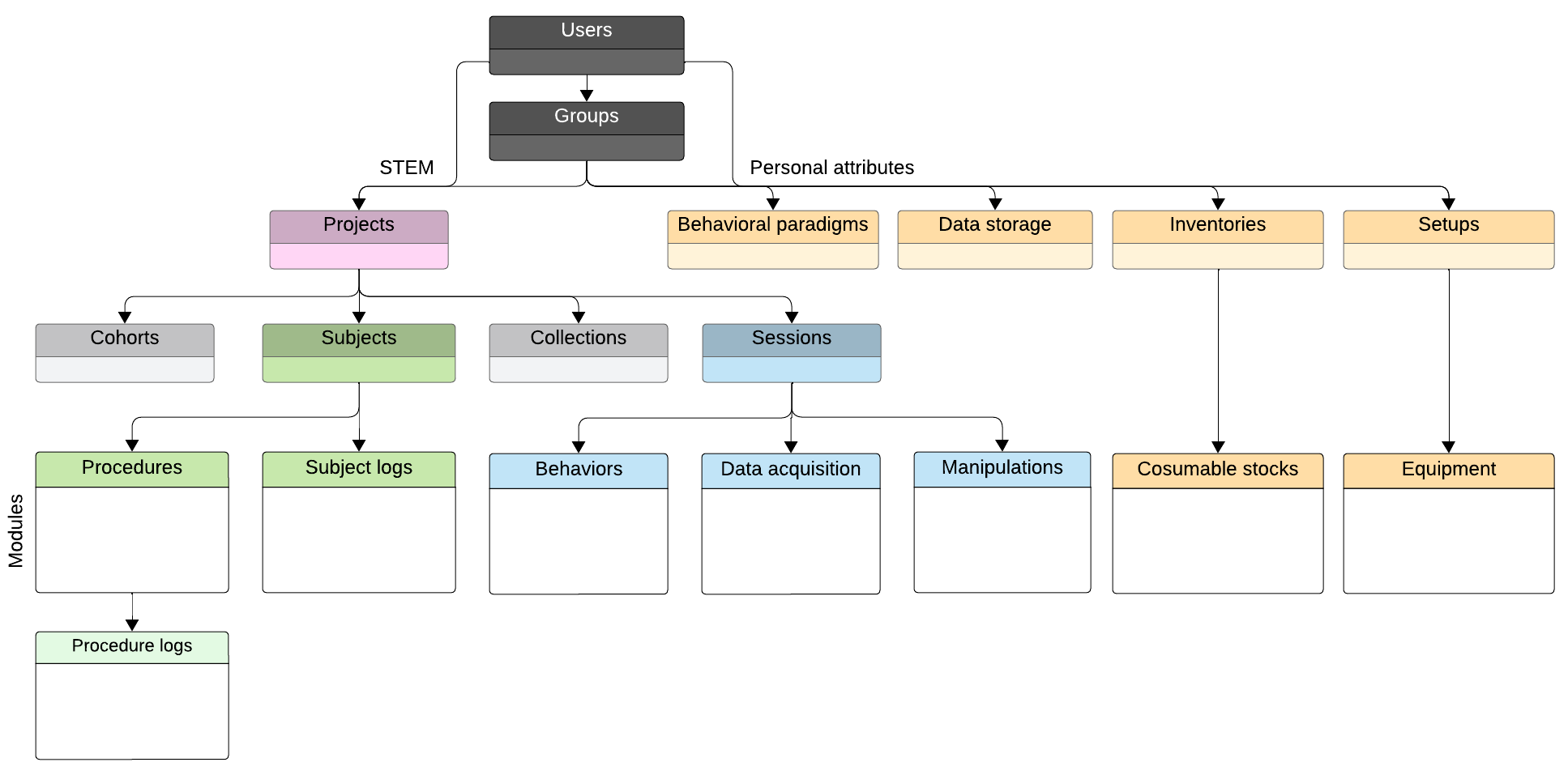
Permission Levels Overview
| Permission levels | Groups | Projects | Personal Attributes |
|---|---|---|---|
| Permission scope | 3 levels, users only | 4 levels for groups & users | 4 levels for groups & users |
| Members | Inherit project permissions | Read access to: - subjects - sessions - modules | Read access to: - attributes - equipment |
| Contributors | - | Create/edit/delete models | Create/edit/delete equipment |
| Managers | Add/remove members | Add/remove members & groups | Add/remove members & groups |
| Owners | Manage group details Add/remove managers | Edit project details Add/remove managers | Edit attribute details Add/remove managers |
Permission Levels
Group Permissions
Groups are the foundation of BrainSTEM’s permission system, offering three distinct permission levels:
| Permission Level | Capabilities |
|---|---|
| Owner | - Manage group details and settings - Add/remove managers - Associate group with laboratory - Rename group - Manage public access settings |
| Manager | - Add/remove regular members - Create member invitations - Remove users from group |
| Member | - Access group resources - Inherit project permissions assigned to group - View group content - Leave group voluntarily |
Project Permissions
Projects implement four permission levels that can be assigned to both individual users and groups:
| Permission Level | Capabilities |
|---|---|
| Owner | - Manage project details - Add/remove managers - Has all Manager permissions |
| Manager | - Add/remove project members - Add/remove project groups - Has all Contributor permissions |
| Contributor | - Create/edit/delete project related models - Has all Member permissions |
| Member | - Read access to project, project-related subjects - Read access to sessions and modules |
When applied to groups, these permissions extend to all group members automatically.
| Group Permission Level | Effect on Group Members |
|---|---|
| Owner Groups | - All group members can manage project details - All group members can add/remove managers - Includes all Manager group permissions |
| Manager Groups | - All group members can add/remove project members - All group members can add/remove project groups - Includes all Contributor group permissions |
| Contributor Groups | - All group members can create/edit/delete project related models - Includes all Member group permissions |
| Member Groups | - All group members get read access to project, project-related subjects - All group members get read access to sessions and modules |
Permission Inheritance
Projects
The STEM branch follows this hierarchical pattern:
Project
├── Subjects
│   ├── Subject Logs
│   └── Procedures
│       └── Procedure Logs
├── Sessions
│   ├── Behaviors
│   ├── Manipulations
│   └── Data acquisition
├── Collections
├── Cohorts
└── Breedings
Inheritance Rules
| Parent Level | Inheritance Pattern | Inheriting Components |
|---|---|---|
| Project | All project components inherit base permissions | Subjects, Sessions, Collections, Cohorts, Breedings |
| Subject | Direct inheritance with cascading effects | Subject Logs, Procedures, Procedure Logs (via Procedures) |
| Session | Module-level inheritance | Behaviors, Data acquisition, Manipulations |
Personal Attributes
Personal attributes follow their own inheritance structure from groups:
Personal Attributes
├── Setups
│   └── Equipment
├── Inventories
│   └── Consumable stocks
├── Data storages
├── Behavioral Assays
├── Licenses
└── Protocols
Group Level Inheritance
| Parent Level | Inheritance Pattern | Inheriting Components |
|---|---|---|
| Group | Direct inheritance from associated groups | Personal Attributes (Behavioral Assays, Data Storage, Setups, Inventories, Licenses, Protocols) |
| Experimental Setup | Direct inheritance with module-level access | Equipment |
| Inventory | Direct inheritance with module-level access | Consumable Stocks |
- All personal attributes inherit permissions directly from their associated groups
- Group membership automatically grants access to personal attributes
Protocol Permissions
Protocols have independent member, contributor, manager, and owner permissions. The creator is an owner, and groups selected during creation receive contributor permissions. Owners edit protocol details and public access; managers manage member and contributor access. Protocol permissions are not inherited from a project that references the protocol.
Public Sharing
Public Sharing of Projects
When a Project is made public:
- All associated components become publicly accessible
- Only project owners can make a project public
- Public access is read-only for anonymous users
- Authorized users retain their edit capabilities
Public Sharing of Personal Attributes
- Each Personal Attribute requires individual public sharing settings
- Only owners can modify public access settings
- Enable public access separately for behavioral assays, data storage, setups, licenses, and protocols that you want readers of a public project to access
Permission Management
Project Permissions
- Access: Project page → Manage → Permissions
- Actions: Add/remove users/groups, modify permission levels, set public access
Group Permissions
- Access: Group page → Your group
- Actions: Add/remove members, modify member roles