Public data
Table of contents
- Overview
- The public portal
- Interactive data model and data graph
- Public API
- Using public data
- What becomes public
- How to share your data publicly
Overview
The BrainSTEM public portal makes published experimental metadata available to anyone, without an account. Labs publish a project by setting its Project visibility to Public; the project and everything that belongs to it then appears in the public portal and the public API, where it can be browsed, cited and reused.
For data sharers:
- Make your research discoverable and reusable by publishing it through the public portal.
- Link your entries to external repositories (for example DANDI, OpenNeuro or Zenodo) for persistent access to raw data and code.
- Keep your work citable: publications and journals linked to a project are part of its public record.
For data reusers:
- Browse public projects, subjects, sessions, collections and the shared catalogues of species, strains, consumables and hardware, no login required.
- Read the full metadata of every public entry, with the same details pages as the private portal.
- Query the same data through the public API, the reference pages and the published schemas described below.
The public portal
The public portal is at www.brainstem.org/public/. It is read-only and shows:
- A Dashboard with counts and the newest public entries, plus statistics such as strain, consumable and hardware device usage across public projects.
- List views of every model, with 50 entries per page. Anonymous visitors see the lists without filters, sorting, column settings, bulk actions or exports; Show all is disabled. Signed-in users can use filters and columns in the public portal as in the private portal.
- Details pages for every public entry with its related entries, the probe schematics of catalog designs and the Coordinates of procedures.
- The Pending approvals page listing catalogue submissions under review.
Anonymous browsing of the public portal pages is rate limited to 300 page views per five minutes per address; signed-in users are exempt.
Interactive data model and data graph
The Interactive data model (Help & Documentation menu) shows every model with its fields and relations; the Data graph (Tools menu or the Graph button on a details page) counts your entries by kind and narrows them to a selected entry. Both require a signed-in account, also in the public portal. A self-hosted version of the diagram that needs no account is on this site at Interactive data model.
Public API
Everything in the public portal is also available through the public API at /api/public/, read-only and without a token: https://www.brainstem.org/api/public/{app}/{model}/. It uses the same filters, includes and pagination as the private API, see the API documentation. Anonymous requests are limited to 60 per minute per address.
Two further public endpoints need no account:
- Reference pages at
/reference/: Markdown and JSON pages generated from the application that describe the data model, query syntax, relationships, vocabularies and per-type schemas, written for developers and AI agents. See the reference API. - Schemas at
/schemas/: the JSON schemas of every type-specific details block, current and versioned (/schemas/{Family}/{Type}.json,/schemas/{Family}/{Type}/{version}.json). See Public schemas.
The MCP server also answers read-only requests for public data without a token.
Using public data
This section is for researchers outside the lab that published a project. You need no account and no token.
Query the public API
List the public projects, then the sessions of one of them. <project-id> is the id in the address of the project’s page in the public portal.
curl https://www.brainstem.org/api/public/stem/project/
curl -g "https://www.brainstem.org/api/public/stem/session/?filter{projects}=<project-id>"
With the Python API tool, an anonymous client sends no token and reads the public portal only:
from brainstem_api_tools import BrainstemClient

client = BrainstemClient(anonymous=True)
projects = client.load("project", portal="public", load_all=True)["projects"]
sessions = client.load("session", portal="public",
                       filters={"projects": "<project-id>"}, load_all=True)["sessions"]
With the MATLAB API tool:
client = BrainstemClient('anonymous', true);
out = client.load('session', 'portal', 'public', 'filter', {'projects', '<project-id>'}, 'load_all', true);
Anonymous requests are limited to 60 per minute per address; load_all pages through large projects for you.
Reach the data files
BrainSTEM stores metadata, not the recordings themselves. A public session points to its data in two ways:
- Repositories on the project and session pages link to external repositories such as DANDI or OpenNeuro. In the API they are the session’s
download_links; a project’s repository links are shown on its page only. - Download sources on a session page link to the session’s folder on a data storage, when one of the data storage’s Data protocols is marked Public Access (which also makes the storage public). The link is the protocol’s path followed by the folders of the storage’s data organization.
Exports
A project or session export needs read access to the project as a member, also when the project is public. Outside readers use the public API instead, which returns the project’s public entries.
Cite public data
- Cite the address of the public entry, for example
https://www.brainstem.org/public/stem/project/<project-id>/, or its API addresshttps://www.brainstem.org/api/public/stem/project/<project-id>/. The id in the address does not change; the address stops working if the owners make the project private or delete it. - BrainSTEM does not assign DOIs to projects. Cite the publications linked to the project (with their DOIs) and the external repositories that hold the data, with their own identifiers.
- Schema-validated details can be cited by their versioned schema URL, see Public schemas.
Terms of use
BrainSTEM publishes terms of use for the reference and the schemas at https://www.brainstem.org/reference/license.md. These terms do not cover the entries of public projects, and BrainSTEM states no licence for them.
What becomes public
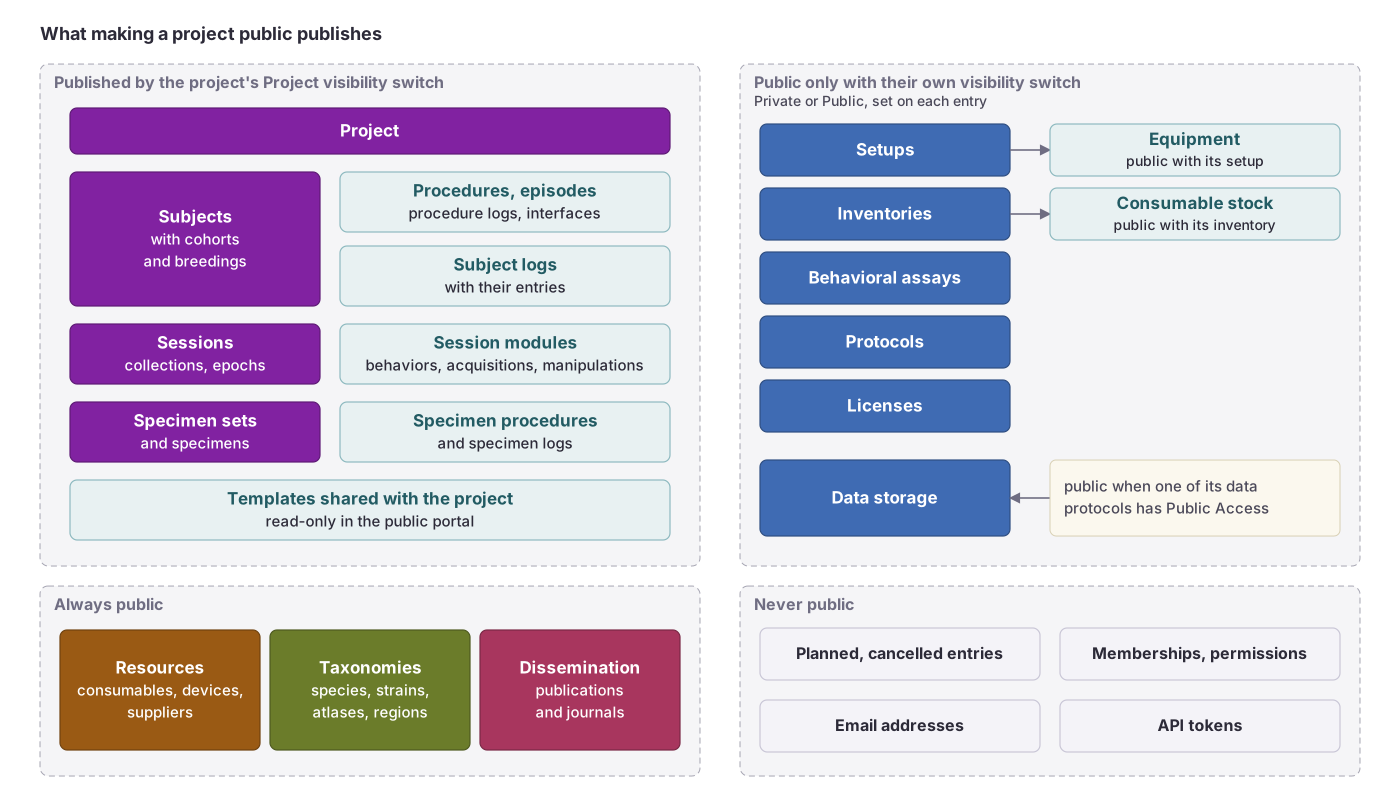 What the project’s visibility switch publishes, what needs its own switch, what is always public and what is never public.
Making a project public publishes, at once, the project and everything that inherits from it:
- Subjects, cohorts and breedings of the project; subject logs.
- Sessions, collections and epochs; the behaviors, data acquisitions and manipulations of those sessions.
- Procedures, procedure episodes and procedure logs of the subjects; experimental interfaces.
- Specimen sets, specimens, specimen procedures and specimen logs.
- Templates shared with the project (read-only in the public portal).
An entry that belongs to several projects is public as soon as one of them is public, even when the others are private.
Independently of projects, these personal attributes have their own visibility setting (Private or Public): setups (with their equipment), inventories (with their consumable stocks), protocols, licenses and behavioral assays. A data storage has no setting of its own: each of its Data protocols is marked Public Access or not, the storage is public when at least one of them is, and only the marked ones appear as Download sources on public sessions (see Reach the data files). Publications, journals, taxonomies and resources (consumables, hardware devices, suppliers) are always public.
Never public: project and group membership lists, permissions, email addresses and API tokens. Uploaded files stay private with two exceptions: the attachment of a public protocol can be downloaded, and images placed in a description are stored at a public address. Public user pages show only the profile image and affiliation.
Marking a planned entry performed in a public project publishes it at once. Until then, planned subjects, specimen sets, specimens and procedure episodes, and planned or cancelled procedures, sessions and breedings stay private, with the behaviors, data acquisitions and manipulations inside a planned session. See Planning.
How to share your data publicly
For a step-by-step guide see the tutorial How to share data publicly.
- Open the project, click Edit and check Public access. You need to be an Owner of the project. The dialog Make this project public? warns: “Are you sure you want to make this project public? This will make all related content visible to the public (subjects, sessions, and modules associated with the project).”
- Everything that inherits from the project becomes public at once, see the public sharing inheritance model.
- Add links to external repositories and publications to your project and sessions to make the raw data and citations reachable.
- Uncheck Public access and confirm Make private in the Stop sharing publicly? dialog to withdraw the project from the public portal and API.