Web API Tool
The Web API tool is the browser view of the BrainSTEM REST API. Open any API address while signed in and you see the response as formatted JSON, with the request method, the response headers and links to related endpoints. It is read-only: nothing can be created or changed from the browser view. Use it to check what a query returns before you write it in Python or MATLAB.
Table of contents
Opening it
Sign in to BrainSTEM, then open an API address in the same browser, for example:
https://www.brainstem.org/api/private/stem/session/
Your browser session is used for authentication; no token is needed. Two shortcuts take you there from the regular interface:
- The API button at the top of every list page opens the list endpoint of that record kind.
- The API links on a subject’s details page open single procedures, subject logs, procedure episodes and experimental interfaces.
Public data is at https://www.brainstem.org/api/public/... and needs no sign-in; the Private and Public buttons in the header move between the two portals.
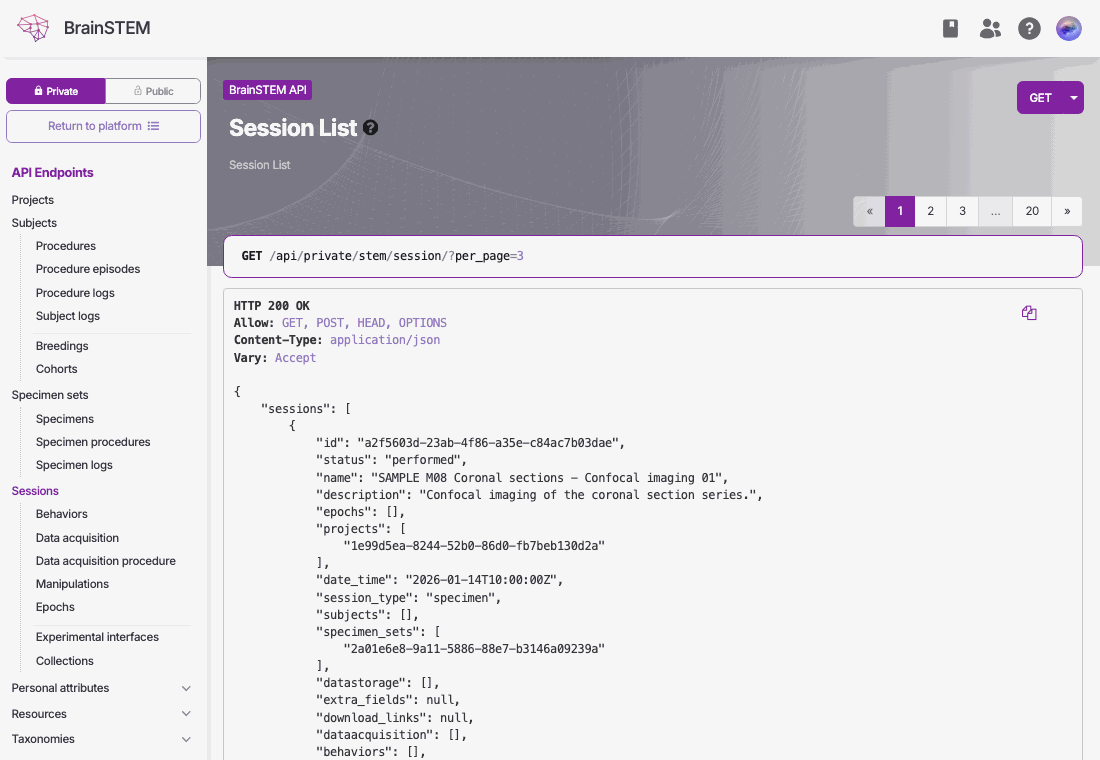
The browser view of /api/private/stem/session/ showing the GET button with its format dropdown, the response headers and the first session of the JSON response
What the page shows
- The request: method and address at the top, with a GET button that repeats the request. Its dropdown chooses a format, and OPTIONS shows what the endpoint accepts.
- Response headers: HTTP status, allowed methods and content type.
- The JSON response: for a list, the records under their plural key (for example
"sessions") and a"meta"object with the page, page size, total results and total pages; for a single record, the record under its singular key ("session"). - Navigation: links to the other endpoints of the private or public portal.
Query parameters
Add filters, sorting, includes and paging to the address exactly as you would in a script, and read the result on the page:
https://www.brainstem.org/api/private/stem/session/?filter{name.icontains}=rat&sort[]=-date_time&include[]=projects.*
The parameters and operators are described on the API page.
Raw JSON
Append ?format=json to get the plain response without the page around it, which is what scripts receive:
https://www.brainstem.org/api/private/stem/session/?format=json
Related
- API documentation: authentication, query syntax, writing rules and errors.
- Python API tool and MATLAB API tool: the same requests from code.
- Public data: what the public portal and API contain.