Probe catalog
Table of contents
- Overview
- Designs as consumables
- The probe schematic
- Picking a design for a stock entry
- Recording an implant
- Requesting a missing design
- Related
Overview
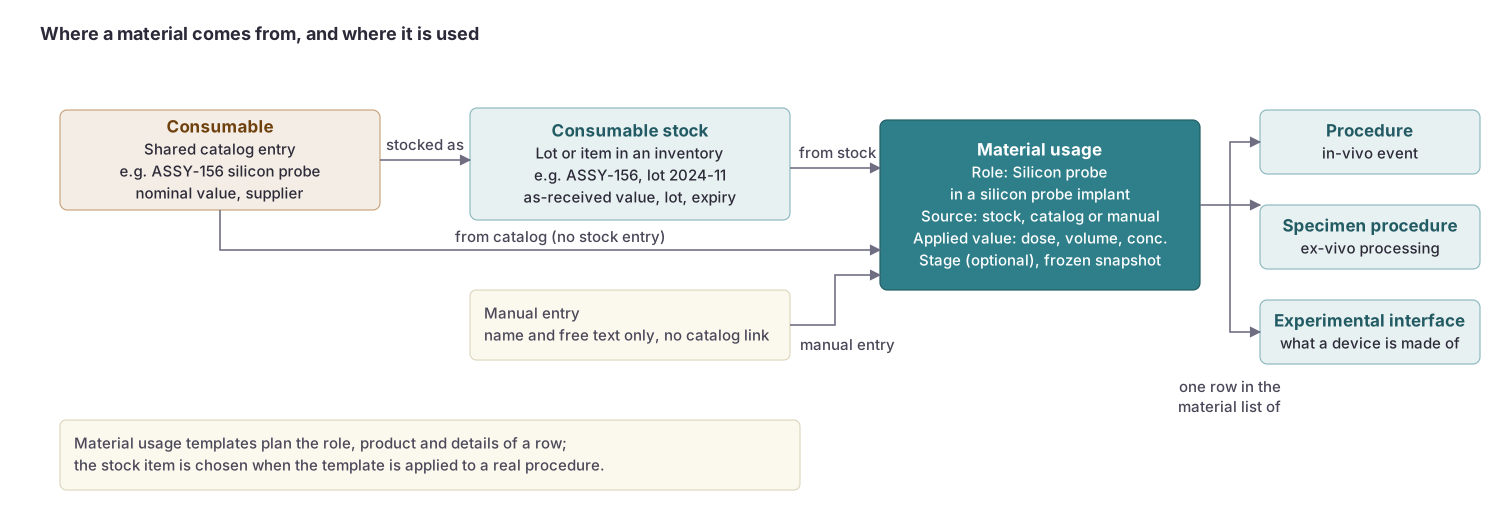
Silicon probes and ECoG arrays are recorded in BrainSTEM through the material chain: a shared catalog entry describes the manufacturer’s design, a consumable stock entry describes the physical probe your lab owns, and an implant procedure records which probe went into which subject. BrainSTEM ships a catalog of probe designs from the main vendors so that you rarely have to type probe geometry yourself. The chain itself is explained on the Materials page.
Designs as consumables
Probe designs are consumables of the type Silicon probe design or ECoG array design (under Resources → Consumables). Each design carries the geometry of the probe in its type-specific details: number of shanks, shank length, width and pitch, number of channels, site layout and pitch, reference sites, and where available the individual site coordinates. Like all shared catalog entries they are visible to every user.
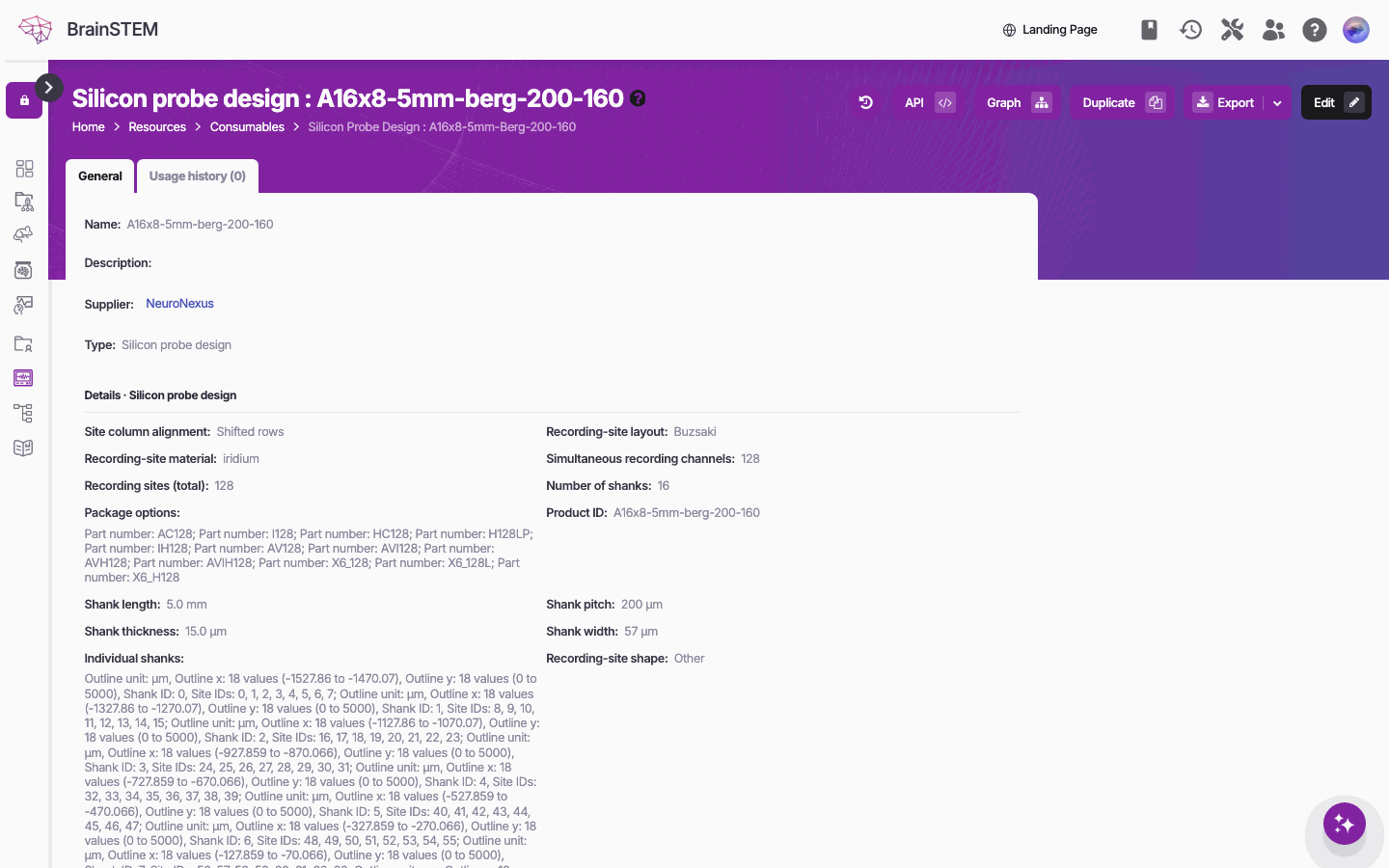
The top of a silicon probe design’s details page: name, supplier, type and the type-specific details, such as the recording-site layout, the number of shanks and the shank dimensions.
At the time of writing the catalog holds 366 silicon probe designs and 95 ECoG array designs:
| Type | Vendor | Designs |
|---|---|---|
| Silicon probe design | NeuroNexus | 175 |
| Silicon probe design | ATLAS Neuroengineering | 126 |
| Silicon probe design | Cambridge NeuroTech | 43 |
| Silicon probe design | IMEC (Neuropixels) | 22 |
| ECoG array design | Blackrock Neurotech | 36 |
| ECoG array design | NeuroNexus | 34 |
| ECoG array design | PMT Corporation | 12 |
| ECoG array design | ATLAS Neuroengineering | 8 |
| ECoG array design | Cambridge NeuroTech | 5 |
Catalog designs are maintained from vendor data. Edits made by users to a catalog design are kept and are not overwritten by later catalog updates. Optic fiber designs from Thorlabs and a large set of virus constructs are shipped the same way.
The probe schematic
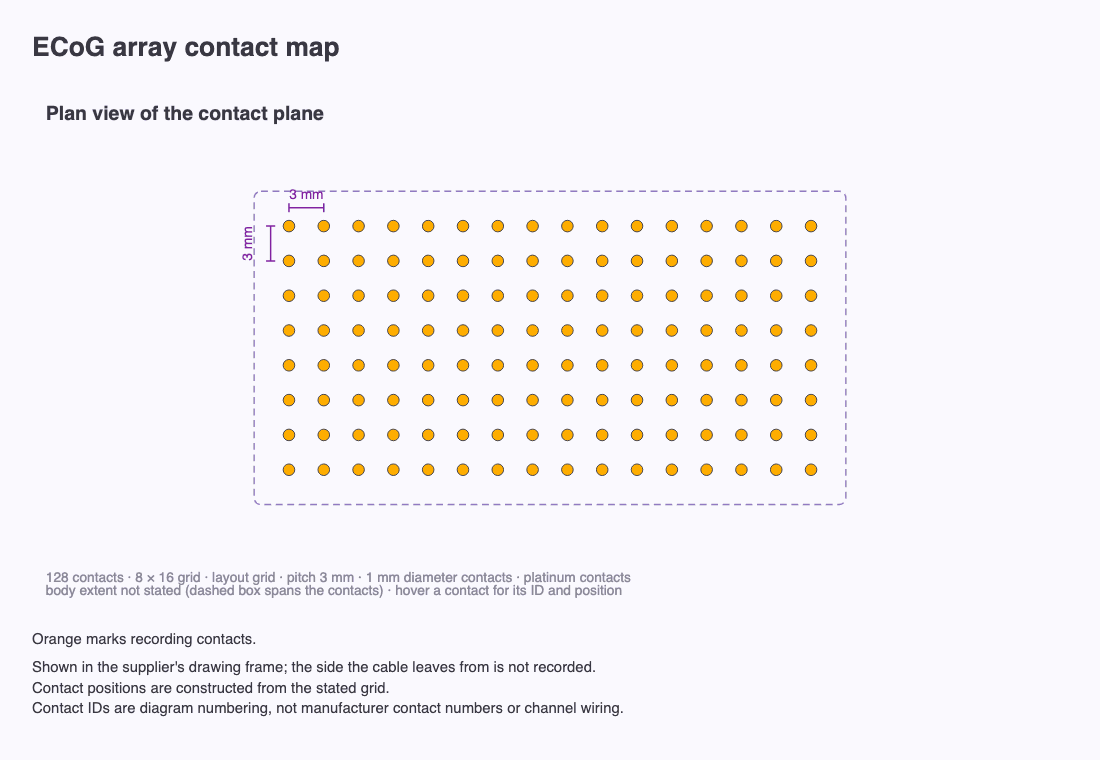
The details page of a silicon probe, ECoG array or optic fiber design shows a drawing generated from its details: “Open the drawing in a new tab to zoom in and hover its parts for details.”
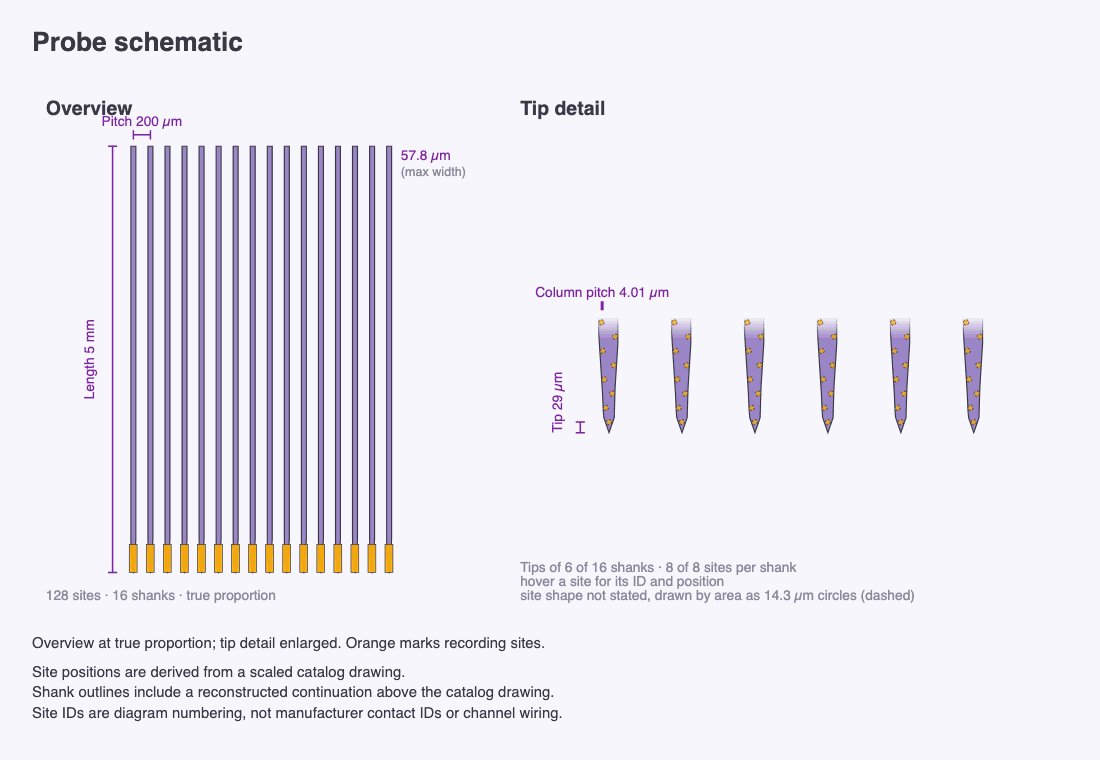
- Overview shows the probe at true proportion; Tip detail enlarges the recording end. “Orange marks recording sites; hollow marks reference contacts.”
- Rulers label Pitch, Column pitch, Tip (or Estimated tip) and Shank pitch. Hovering a site shows “Site {id} · shank {n}” with its position in µm.
- A caption states where the geometry came from: measured site coordinates, a scaled catalog drawing, or nominal dimensions. “Site IDs are diagram numbering, not manufacturer contact IDs or channel wiring.”
- ECoG arrays show an ECoG array contact map.
A thumbnail of the schematic appears in the hover summary of a consumable in lists and pickers. Stock entries do not show the schematic; in implant procedures the shanks are drawn inside the coordinate viewer.
Picking a design for a stock entry
To record a probe your lab owns, add a consumable stock of type Silicon probe or ECoG array in one of your inventories. The Consumable field is required (“Select the consumable you are adding as a consumable stock.”) and only offers designs of the matching type; narrow the list by Supplier first if you like. Add the lot or serial number, acquisition and expiration dates, status and storage location. The stock entry keeps its own status (Available, In use, Reserved, Depleted, Used, Failed/Broken, Expired, …), which you set by hand.
Recording an implant
In a Silicon probe implant or ECoG implant procedure, the probe is a required material in the Materials tab. Choose a source:
- Consumable stock: the probe from your inventory (recommended; records the lot and keeps a snapshot of the stock).
- Consumable: a catalog design when you have no stock entry.
- Manual entry: a name and specification when the design is not in the catalog.
With a stock or catalog source, the coordinate viewer draws the probe with its real shank count and pitch, and the procedure, stock and catalog pages all link to each other through the usage history.
Requesting a missing design
If your probe is not in the catalog, add it yourself: Resources → Consumables → Add consumable, type Silicon probe design or ECoG array design, and fill in the geometry you know. New catalog entries go through the shared approval flow: your entry is saved at once and you can use it immediately, but it is visible only to you until the BrainSTEM team approves it (“PENDING: This submission is under review. It is only visible to the creator until approved and can be used privately.”). You are emailed when the status changes. Designs with incomplete required fields are not published until they are completed.
Related
- Materials: the chain from catalog design to stock entry to implant
- Consumables and Consumable stocks: the two kinds of entry a probe is recorded as
- Procedures: the implant procedure types
- Atlases and coordinates: the viewer that draws the probe in the atlas
- Submission forms: the Materials tab where the probe is chosen
- Resources & Taxonomies: submitting a design that is missing from the catalog