Planning
Table of contents
- Overview
- Which records can be planned
- How planned records look
- Creating a plan
- Transitions
- Validation rules
- What listings, counts and public pages show
- Related
Overview
BrainSTEM lets you prepare records before the work happens. A planned procedure, session or breeding holds the intended date and all the details, and is turned into a performed record once it has taken place. Plans that are dropped are kept as cancelled for the record.
The Status field explains it in the form: “Planned: prepared but nothing has happened yet. Performed: this record describes what was done. Cancelled: planned and then dropped; kept for the record.”
Which records can be planned
| Record | Statuses |
|---|---|
| Procedure, specimen procedure, session, breeding | Planned, Performed (default), Cancelled |
| Subject | Planned, Active, Inactive, Transferred, Deceased, Unknown |
| Procedure episode | Planned, Draft, Active, Post-operative, Complete |
| Specimen, specimen set | Planned, Available, In use, Reserved, Consumed, Discarded, Lost |
Epochs, behaviors, data acquisitions and manipulations have no status of their own; they follow their session.
How planned records look
- An orange Planned or grey Cancelled pill is shown beside the title of the form and the details page. Hover for an explanation: “This procedure is planned. Nothing on this page has been done to the subject yet; the date is the intended date. Mark it as performed once it has happened.” or “This was planned and then cancelled. It is kept for the record.” The pill updates as you change the Status select.
- In dropdowns, links and breadcrumbs the name is prefixed with Planned: or Cancelled:. Subjects are the exception; they rely on the status badge.
- List views show a Status badge column and a Status filter with Performed, Planned, Cancelled and Planned or cancelled. Lists show all rows, planned ones included.
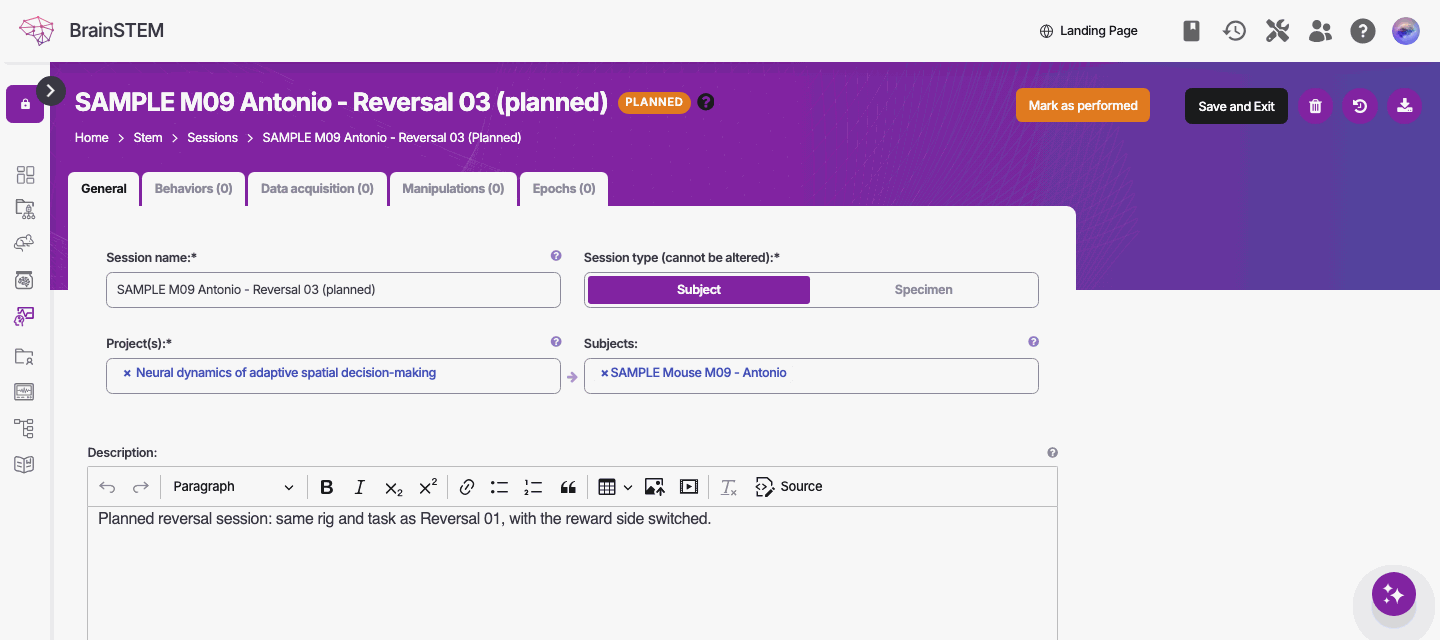
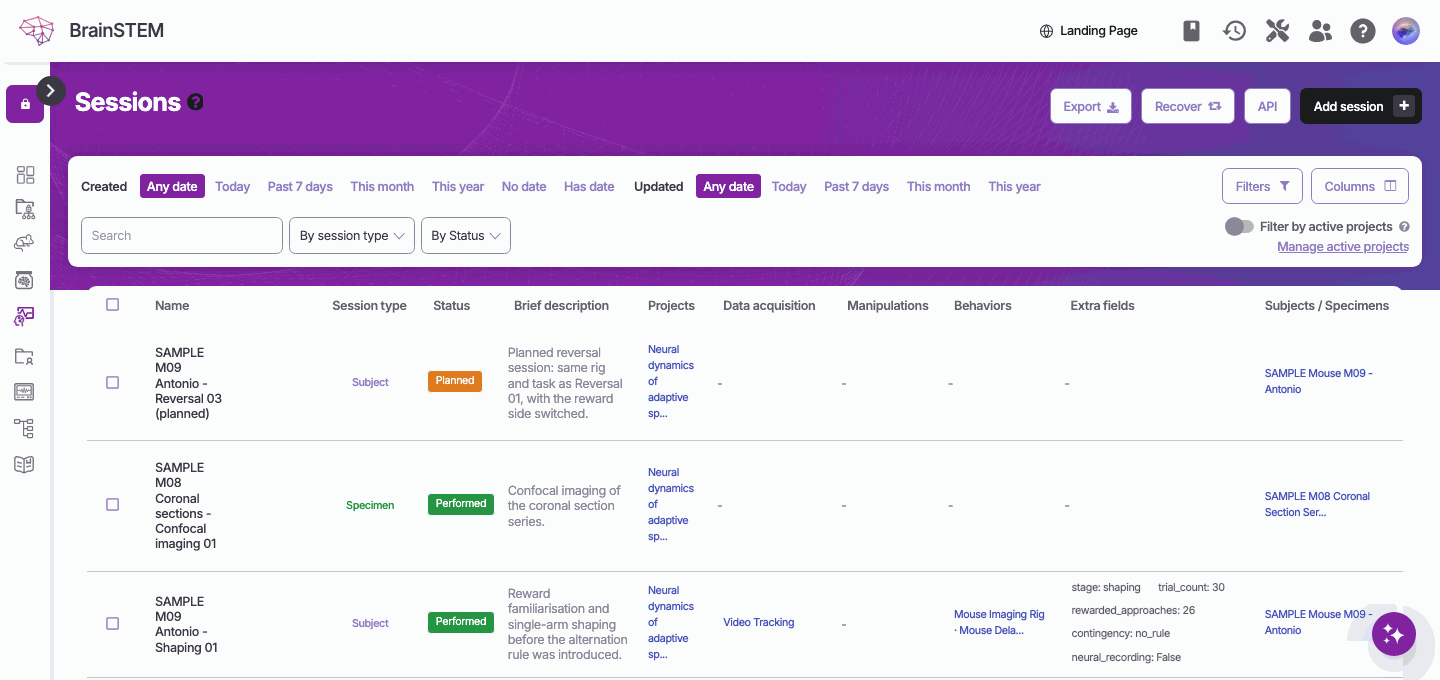
Creating a plan
Set Status to Planned when you create the record, or duplicate an existing subject, session, specimen set or episode with Copy as a plan: “Everything copied is marked planned, as preparation for work that has not happened yet.” See Duplication.
Transitions
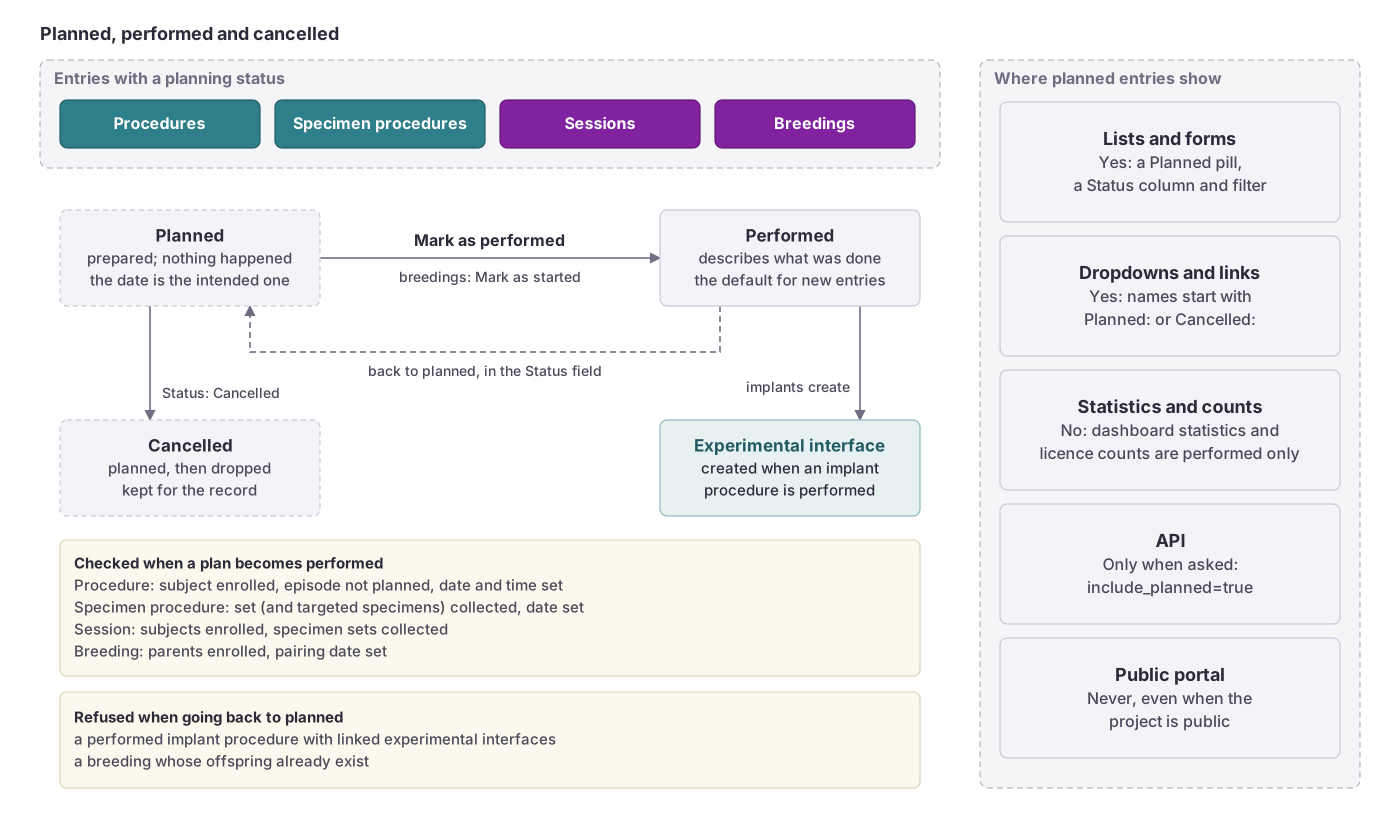
While a record is planned, its form shows a transition button in the header; the details page shows the Planned pill. The same transitions exist as bulk actions in list views for several rows at once.
| Record | Button | Result |
|---|---|---|
| Procedure, specimen procedure, session | Mark as performed | Status Performed |
| Breeding | Mark as started | Status Performed |
| Subject | Enroll subject | Status Active |
| Procedure episode | Start episode | Status Active |
| Specimen, specimen set | Mark as collected | Status Available |
A transition checks the whole record and is recorded in the history as “{label} (planning transition)”. On success the page shows “{label}: {record}”; otherwise “Could not complete the change: …” with the reason. You need change permission on the record.
When a planned implant procedure is marked as performed, its experimental interface is created at that moment, in the same way as for a procedure saved as performed. The form notes this: “Creating this procedure also creates a/an {label} experimental interface for the subject, unless the procedure is planned…”.
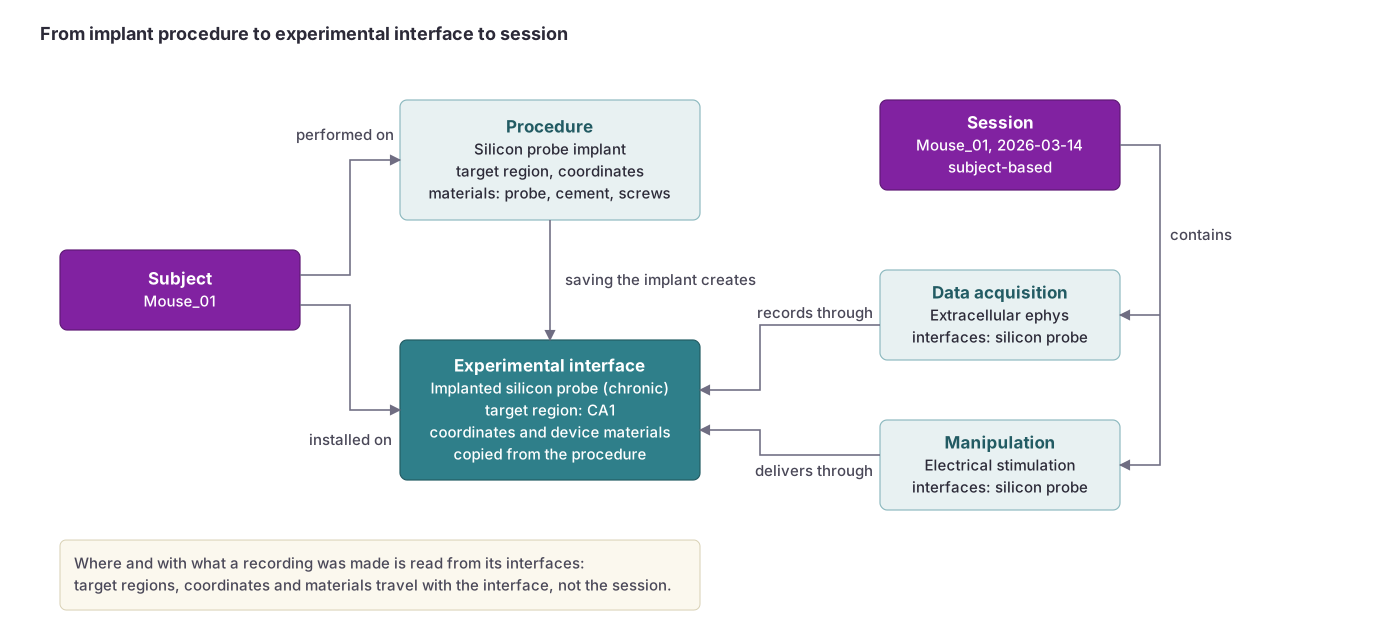
Once a performed implant has an experimental interface, it cannot go back to planned: “This procedure has linked experimental interfaces, so it cannot go back to planned. Remove the interface links first.”
Validation rules
Plans are checked so that nothing performed depends on something that has not happened yet. In plain words:
- A performed procedure needs an enrolled subject: “This subject is still planned. Enroll the subject before recording a performed procedure, or keep the procedure planned.”
- A performed procedure cannot belong to a planned episode: “This episode is still planned. A performed procedure cannot belong to a planned episode…”
- Marking a procedure as performed requires its date: “Set the date and time the procedure was performed.”
- A performed session cannot include planned subjects: “Planned subjects cannot take part in a performed session: … Enroll them first, or keep the session planned.”
- A performed specimen procedure needs collected material: “This specimen set is still planned (not collected yet). Mark the set as collected before recording a performed procedure on it…”
- A planned breeding has no offspring yet: “This breeding is still planned, so its offspring cannot exist yet…”
- Planned subjects and episodes cannot carry log entries: “…Enroll the subject first.” and “…Start the episode to record observations.”
What listings, counts and public pages show
- List views in the web interface show planned, performed and cancelled rows together; use the Status filter to separate them.
- Dashboard statistics and licence counts use performed records only.
- The public portal never shows planned subjects, specimen sets or specimens, nor planned or cancelled procedures, sessions or breedings, even when the project is public. See Public data.
API lists return performed entries only, unless you ask for planned and cancelled ones. A script that lists entries through the API without asking does not see your plans; see the API documentation for how to include them.
Related
- Submission forms: the Status field and Copy as a plan on the duplicate page
- Single entry view: the Planned pill in the header
- List view: the Status filter and the bulk transitions
- Procedures, Sessions and Breedings: the entries with a planning status
- Permissions: who sees planned records