Specimen set model
Table of contents
- Introduction
- Fields
- Types of specimen sets
- Status and conditions
- Deleting a specimen set
- Permissions
- API access
Introduction
A specimen set is a batch of ex-vivo biological material that was prepared together: a series of acute brain slices, a series of histological sections, a batch of organoids, a culture, a well plate, or a piece of whole tissue. It is the ex-vivo counterpart to the subject. A set is usually derived from a subject, but it can also be derived from another specimen set (for example a section series cut from a whole brain). The set records where the material came from, its current state and its storage. It is not a live animal (it carries no welfare, genotype or license fields), not an organizational collection, and not the processing event that produced it.
Specimen sets are the permission anchor for the whole specimen cluster. The following entries hang off a specimen set and inherit their permissions from it:
- Specimens: Individually tracked items of the set (a single slice, section, well, culture item, organoid or tissue piece). Specimens are optional. A set that does not need per-item tracking just records an item count.
- Specimen procedures: Processing events performed on the set or on selected specimens, such as dissection, sectioning, fixation, clearing and staining.
- Specimen logs: Monitoring streams for the material, such as bath solution, temperature, pH, CO₂ or slice health.
- Experimental interfaces: Hardware access points that target a specimen set instead of a subject, such as a multi-electrode array, a patch pipette or a bath perfusion line.
Specimen sets can take part in sessions. A session is either subject-based or specimen-based (its session type is set on creation). A specimen session links one or more specimen sets instead of subjects, and its data acquisitions and manipulations use the experimental interfaces of those sets.
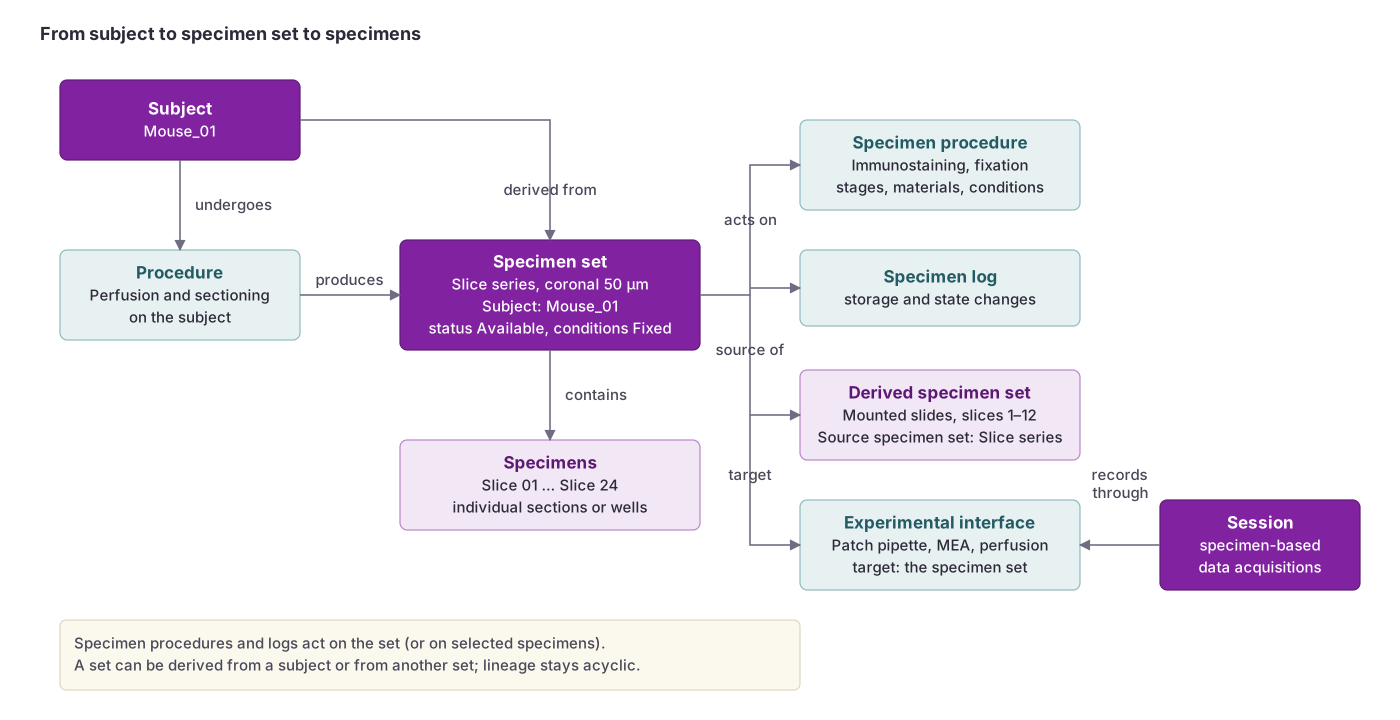 A specimen set is the ex-vivo counterpart of a subject: it holds the individual specimens, is processed by specimen procedures and logs, can give rise to derived sets, and is recorded through interfaces whose target is the set.
Fields
| Field | Description |
|---|---|
Name | Name of the specimen set (required; string; maximum length: 100 characters; must be unique across BrainSTEM). Example: “Mouse_01_coronal_sections”, “Organoid_batch_2026_03” |
Type | Kind of material in the set (required). Selected from predefined types (default: Slice series). See options below. |
Projects | Projects the specimen set belongs to (required). Can belong to multiple projects. Learn more about project inheritance here. |
Status | Current availability of the material (required; default: Available). Choices: Planned (the material does not exist yet, for example a histology pipeline prepared before the animal is terminated), Available, In use, Reserved, Consumed, Discarded, Lost. The status says whether the material can be selected and used; it is independent of the preparation state. |
Quality | Overall quality assessment of the set. Choices: Excellent, Good, Fair, Poor, Not assessed. |
Subject | The subject this set was derived from, if applicable. Example: “Mouse_01” |
Source specimen set | The specimen set this set was derived from, when the material comes from another set rather than directly from a subject. Lineage must stay acyclic: a set cannot be derived from one of its own derivatives. |
Target regions | Anatomical regions contained in or targeted by the material. Can include multiple regions. Regions belong to an atlas, so the same acronym can exist in several atlases. Example: “CA1”, “Primary visual area” |
Starting conditions | Processing the material had already undergone when the set was created, for example fixed by perfusion before extraction. Choices (several can apply): Fixed, Cryoprotected / frozen, Embedded, Cleared, Stained / labelled, Mounted. No condition means fresh / unprocessed. |
Preparation conditions | The starting conditions plus the conditions added by performed whole-set specimen procedures (read-only). Recomputed automatically; conditions accumulate and never go away. |
Item count | Total number of items in the set. Useful when individual specimens are not tracked. Example: 24 |
Preparation date and time | When the set was prepared (datetime format YYYY-MM-DD HH:mm:ss). Example: “2026-03-14 09:30:00” |
Termination date and time | When the set was consumed, discarded or otherwise terminated. |
Storage location | Current physical storage location, container or slot (string; maximum length: 100 characters). Example: “Freezer B, rack 3, box 12” |
Storage conditions | Current storage conditions, such as temperature and medium (string; maximum length: 100 characters). Example: “-80 °C in OCT”, “4 °C in PBS with azide” |
Description | A rich text description of the set. Pictures can be uploaded and inserted through rich text formatting. |
Tags | Tags for the set. Great for organizational purposes, quick labeling and filtering. Example: “histology”, “pilot” |
Custom fields | Custom key-value fields that the standard fields do not cover. Values can be text or numbers. |
Type specific fields | Fields that depend on the selected type, such as the orientation and default thickness of a series or the plate format of a well plate. See the Specimen set types schema. |
Types of specimen sets
These are the available type options. See the schema for field details: Specimen set types.
Slice series: A series of acute or organotypic slices cut from one piece of tissue, typically for ex-vivo electrophysiology or imaging.
Section series: A series of thin histological sections, typically for staining, labeling and microscopy.
Organoid batch: A batch of organoids from one production run.
Culture: A cell or tissue culture kept on a substrate in a medium.
Well plate: A multi-well plate with a fixed plate format, where each well can be tracked as a specimen.
Whole tissue: An intact organ or piece of tissue, such as an extracted brain, before further processing.
Other: Material that does not fit the types above.
Status and conditions
Two independent vocabularies describe a set. The status answers whether the material can be used right now (Planned, Available, In use, Reserved, Consumed, Discarded, Lost). The preparation conditions answer what has been done to it (Fixed, Cryoprotected / frozen, Embedded, Cleared, Stained / labelled, Mounted). You enter the starting conditions yourself when you create the set. The preparation conditions are then computed from the starting conditions and from the performed specimen procedures on the whole set. Only performed procedures count: planned and cancelled procedures do not change the conditions.
A planned set is the row that planned specimen procedures hang off before the material exists. It cannot be used in a session until it has been collected and its status moves on from Planned.
Deleting a specimen set
Deleting a specimen set also deletes its specimens, specimen procedures, specimen logs and the experimental interfaces that target it. Recover on the specimen sets list restores the set together with them; see Deleted entries.
Permissions
Specimen sets inherit permissions from the projects associated with them. Specimens, specimen procedures, specimen logs and specimen-based experimental interfaces all inherit permissions through the specimen set. You need to be at least a Contributor on the projects involved to create or edit a set.
Visit the permissions page to learn more.
API access
The API allows for programmable access to specimen sets. Learn more about the specimen sets’ fields and data structure on the Specimen set API page.