Exports
BrainSTEM exports one project, or one session with everything it touches, as a single versioned JSON document. The web interface (Project → Download → JSON), the REST API, the API tools and the MCP server all produce the same file. The export is the input of the NWB converter.
Table of contents
Endpoints
| Method and URL | Use |
|---|---|
GET /api/private/stem/project/<id>/export/ | one project, directly |
GET /api/private/stem/session/<id>/export/ | one session, directly |
GET /api/private/stem/project/<id>/export/?session=<session id> | one session through one of its projects |
POST .../export/ | start a background job (body may be {"session": "<id>"} on a project) |
GET .../export-jobs/ | your jobs for the record |
GET .../export-jobs/<job_id>/ | job status; 409 while not ready, 410 once expired; reports file_sha256 |
GET .../export-jobs/<job_id>/download/ | the finished file (gzipped JSON), requester only, kept for 7 days |
A direct export that takes longer than about 30 seconds fails with 503 or 504. Use a background job for large projects; the server emails you when the file is ready.
In the web interface the same options are under Download on a project page: download now, choose a single session, or “Prepare in the background and email me”.
In the API tools
export = client.export_project('<project-id>')                  # Python 2.1.0 and later
export = client.export_session('<session-id>')
export = client.export_project('<project-id>', background=True)  # large projects
export = client.export_project('<project-id>');                  % MATLAB 2.1 and later
client.export_project('<project-id>', 'file', 'project.json.gz'); % keep the original JSON
export = client.export_project('<project-id>', 'background', true);
File format (version 2.1)
{
  "export_info": {
    "format_version": "2.1",
    "exported_at": "2026-10-30T12:00:00Z",
    "scope": "project",
    "project_id": "<id>",
    "project_ids": ["<id>"],
    "session_id": null,
    "lab_resources": "...",
    "restricted": {"personal_attributes.datastorage": [{"pk": "<id>", "name": "Lab server"}]},
    "record_count": 2344,
    "counts": {"stem.project": 1, "stem.subject": 21, "...": 0}
  },
  "records": {
    "stem.project": [{"model": "stem.project", "pk": "<id>", "fields": {"...": "..."}}],
    "stem.subject": [],
    "...": []
  }
}
recordsis keyed by model label (app.model). Every label is present, possibly empty;countsandrecord_countlet you check a download without walking it.scopeisprojectorsession. A session export hasproject_id: null, names the session insession_idand lists the session’s projects you can read inproject_ids.- Records use the database field names, not the API names:
type_json(APIdetails),coordinatesandcoordinates_json(APIcoordinates_system,coordinates_details),extra_content_json(APIextra_fields). Each JSON payload comes with its*_schema_version; the schema itself is athttps://www.brainstem.org/schemas/<Family>/<Type>/<version>.json(see Public schemas). - Links are primary keys. Many-to-many fields are sorted lists of keys. Ordered or annotated links (cohort subjects, session data storages, interface links) and log entries are separate records written right after their parent.
- Referenced catalog entries (species, strains, anatomical regions and their atlases, consumables, suppliers, publications) are included, and so are the users named on records, with first and last name only. No emails, logins or permissions are exported.
- Lab resources (setups, equipment, assays, protocols, licenses, inventories, stocks, data storages) are included only when the records use them and you can read them.
export_info.restrictednames, by key and name, the referenced lab resources you cannot read, so two people can get different files. - A session export holds the session, its recordings, manipulations, behaviors and epochs, the subjects and specimen sets linked to it with their whole procedure history, and the cohorts, collections and breedings that involve them.
- Minor versions (2.2, …) only add labels and keys; ignore unknown ones. Major versions may rename or remove.
What the file does not contain
- Data files. Data acquisition records describe files by name and storage location only.
- Records of projects you cannot read. References to them stay bare keys.
From export to NWB
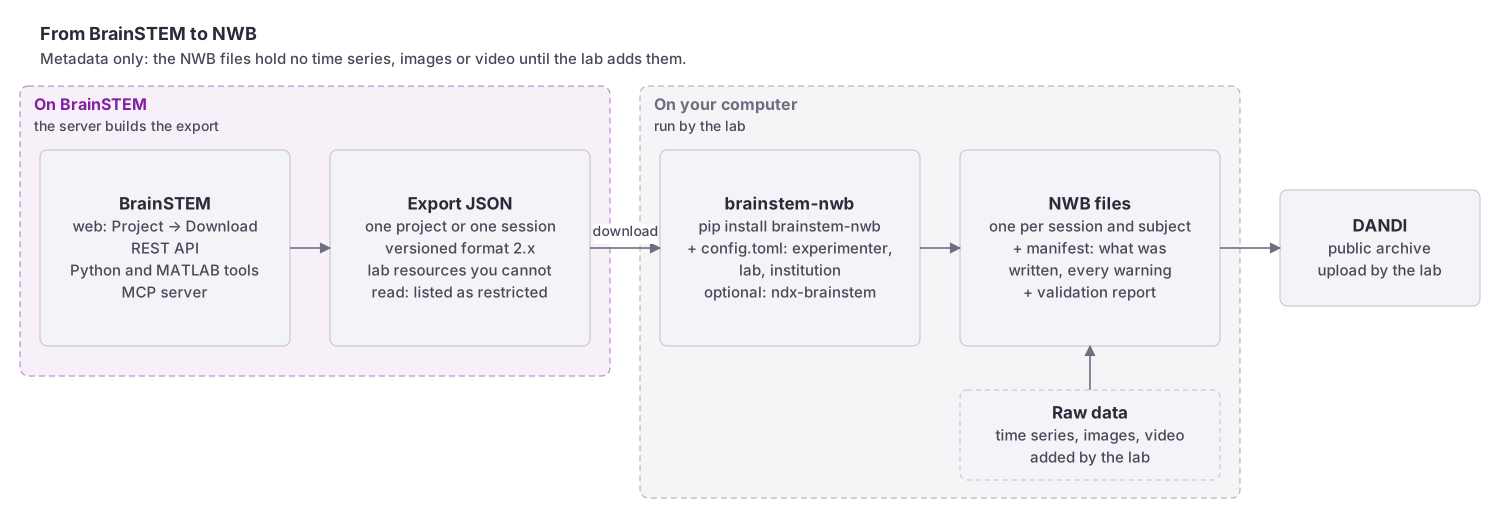 From a BrainSTEM export through brainstem-nwb to one NWB file per session and subject, with a conversion manifest and a validation report. The files hold metadata only; raw data is added to them separately.
The brainstem-nwb converter turns a project or session export into Neurodata Without Borders files, one per session and subject, and the ndx-brainstem extension stores the complete BrainSTEM records inside those files.