Epoch model
Table of contents
Introduction
An epoch is a named time segment within one session: a baseline, a stimulation block, a recovery period. It is defined by a start and an end measured from the session onset. Epochs turn a session from a list of modules into a timeline. The behavior, data acquisitions and manipulations of the session can be attached to the segment they belong to.
Times are relative to the session’s own date and time, so set the session onset before relying on epoch boundaries. The end of an epoch cannot be before its start. Epochs carry no planning status of their own; they follow the status of their session.
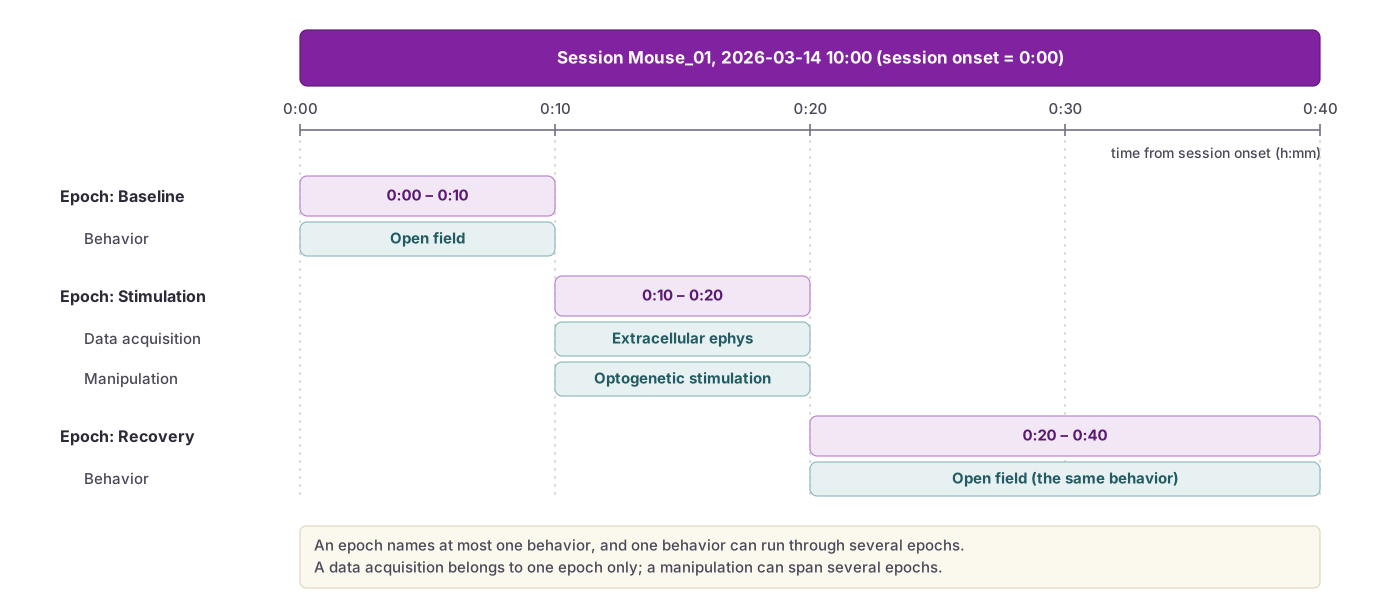 Epochs are named intervals measured from the session onset. Behaviors, data acquisitions and manipulations are linked to the epoch they belong to.
Fields
| Field | Description |
|---|---|
Name | Name of the epoch (required; string; maximum length: 100 characters). Name it for what was happening, since the times alone will not tell a reader that. Example: “Baseline”, “Stimulation period”, “Recovery” |
Session | The session the epoch belongs to (required). It supplies the permission context and determines which behaviors, data acquisitions and manipulations can be linked. |
Start | When the segment begins, as a duration from the session onset (HH:MM:SS). Leave empty if the segment runs from the beginning of the session. Example: “00:00:00” |
End | When the segment ends, as a duration from the session onset (HH:MM:SS). Leave empty if the segment runs to the end of the session. Example: “00:05:00” |
Order | Position of the epoch within the session’s epoch list (number; default 0). Set by dragging rows in the web interface. Epochs with the same order are sorted by start time. |
Behavior | The behavior running during the segment. One behavior per epoch; the same behavior may be linked to several epochs. |
Data acquisitions | The data acquisitions recorded during the segment. Concurrent recordings (for example video and electrophysiology) all sit on the one epoch. A data acquisition can belong to only one epoch, because a recording covers one stretch of time. |
Manipulations | The manipulations delivered during the segment. The same manipulation may be linked to several epochs, because one stimulation protocol can be delivered in more than one segment. |
The epoch timeline
Epochs are edited on the Epochs tab of the session page. The session’s behaviors, data acquisitions and manipulations sit in a palette under the epoch list. Drag one onto the epoch it belongs to, or use the “+ Behavior”, “+ Data acquisition” or “+ Manipulation” button under an epoch to pick from a list. A data acquisition that is already linked to another epoch is shown greyed in the palette, and dropping it on a new epoch moves it.
The timeline above the list redraws as you type start and end times. It can be grouped by epoch (each epoch with its links beneath it) or by kind. Rows can be dragged by their handle to reorder them, or sorted by start time in one click.
Permissions
Epochs inherit permissions through their session, and so from the projects of that session. You need to be at least a Contributor on one of those projects to add or edit an epoch.
Visit the permissions page to learn more.
API access
The API allows for programmable access to epochs. Start and end are durations relative to the session onset, not absolute timestamps. Learn more about the epochs’ fields and data structure on the Epoch API page.