Experimental interface model
Table of contents
- Introduction
- Fields
- Types of experimental interfaces
- Materials
- Interfaces in sessions
- Templates
- Permissions
- API access
Introduction
An experimental interface is the point where hardware meets the animal or the tissue: an implanted silicon probe, an optic fiber, an injection cannula, a cranial window, a headpost, an EEG montage, a multi-electrode array under a slice, or a camera pointed at the arena. It is a persistent entry describing what is installed or configured and where it sits. A procedure records what was used in an event; an interface records what the installed device is made of and where it is.
Most interfaces are created automatically. Saving an implant procedure (for example a silicon probe implant or an optic fiber implant) creates the matching interface on the subject, with the target regions, coordinates and device materials of the procedure. Interfaces can also be created directly, for example for a transient patch pipette, a bath perfusion line on a specimen set, or a camera that was never implanted. The link between a procedure and the interface it created is kept internally but is not exposed through the REST API.
Interfaces are what sessions refer to. Data acquisitions and manipulations link the interfaces they recorded through or delivered through, not the procedures. Where a recording was made is therefore read from the target regions of its interfaces. An interface is not the lab instrument (that is equipment in a setup, which equipment-backed interface types can point at), not the device product (that is a consumable or consumable stock), and not the signal or stimulus passing through it.
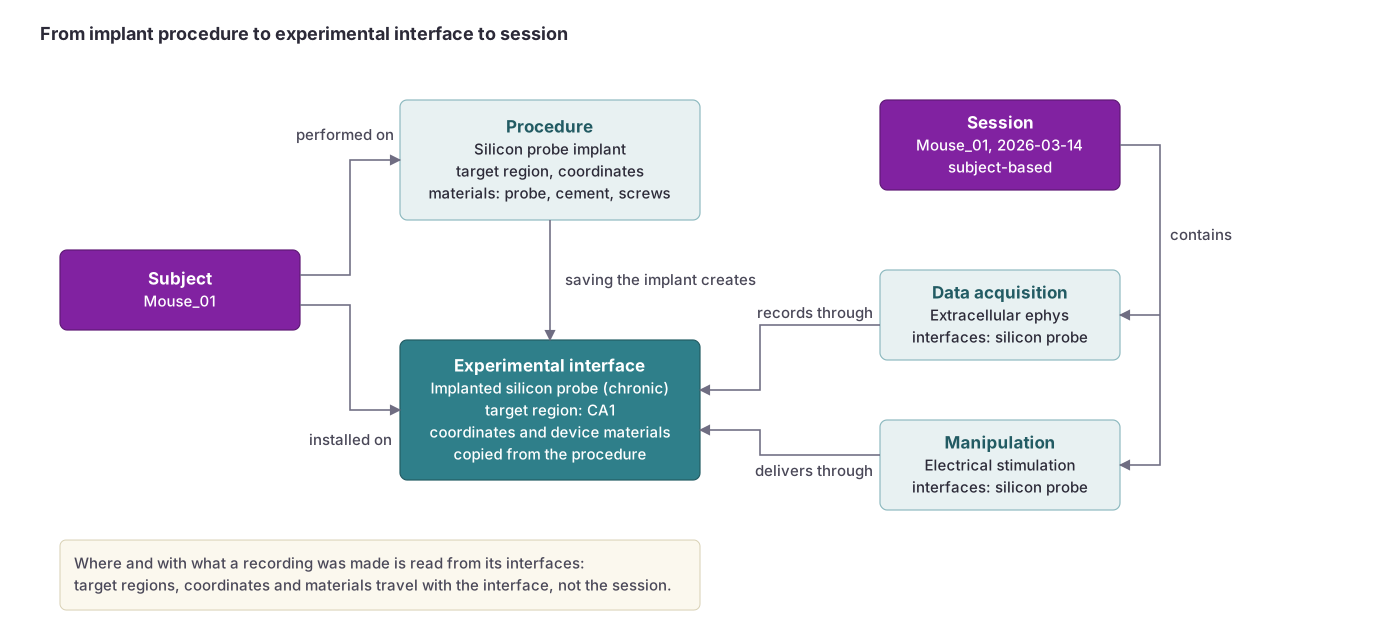 Saving an implant procedure creates an experimental interface on the subject. Sessions record through the interface, so a data acquisition inherits where (target region, coordinates) and with what (materials) it was made.
Fields
| Field | Description |
|---|---|
Name | Name of the interface (required; string; maximum length: 255 characters). Example: “CA1 probe, left”, “Fiber V1” |
Interface type | Type of interface (required; default: Generic interface). Selected from predefined types. See options below. |
Persistence | How long the interface stays in place (required; default: Session-level). Choices: Chronic / persistent (an implant that stays across sessions), Session-level (set up for one session, such as a head-fixed objective or a bath perfusion), Transient / temporary (present for part of a session, such as a patch pipette or an acute probe penetration). |
Target type | What the interface attaches to (required on creation). Choices: Subject, Specimen set. The choice is locked once the interface is saved. |
Subject | The subject the interface is installed on, for subject-based interfaces. |
Specimen set | The specimen set the interface is applied to, for specimen-based interfaces. |
Target specimens | Specific specimens within the set the interface targets. Leave empty when it applies to the whole set. |
Target regions | Anatomical regions the interface targets. Can include multiple regions. This is where recordings and manipulations through the interface are located. |
Coordinate system | Coordinate system used to describe the placement (required; default: Stereotaxic Bregma-based surface coordinates with depth). Includes the stereotaxic, landmark, spinal and atlas systems used by procedures, plus specimen systems (specimen surface XY, specimen surface XY with depth, specimen volume XYZ, container grid row/column, container-local XYZ) for specimen-based interfaces. See the Coordinate systems page. |
Coordinates | The placement values in the selected coordinate system (position, depth, angles). |
Equipment | Equipment the interface is backed by or connected to, such as a microscope objective, a camera or a stimulator. Can include multiple items. |
Installed at | Date and time the interface was installed or set up. |
Removed at | Date and time the interface was removed. Leave empty while it is in place. |
Notes | Notes about the interface (string; maximum length: 500 characters). |
Type specific fields | Fields that depend on the selected type, such as the channel map of a probe or the core diameter of a fiber. See the Experimental interface types schema. |
Materials | Ordered list of the material usages the interface is made of. See below. |
On an interface created by a procedure, the procedure owns the type, installation date, coordinates, target regions, equipment and the copied materials. The form shows them and the subject locked, and later changes on the procedure overwrite them, including values changed through the API. Make such corrections on the procedure. The name, persistence, removal date and notes stay the interface’s own.
Types of experimental interfaces
These are the 43 available type options. See the schema for field details: Experimental interface types.
Electrophysiology
ECG, ECoG, EEG, EMG, Ground electrode, Multi-electrode array (MEA), Nerve cuff, Patch pipette, Reference electrode, Silicon probe, Single wire electrode, Tetrode, Tungsten microelectrode.
Optical
Cranial window, GRIN lens, Microscope objective, Miniscope, Optic fiber, Prism, Widefield macroscope.
Delivery
Bath perfusion, Catheter, Drug delivery line, Injection cannula, Microperfusion line, Osmotic pump.
Stimulation
Auditory stimulator, LED array, Olfactometer, Stimulating electrode, TMS coil, Tactile stimulator, Thermal probe, Ultrasound transducer, Visual stimulator.
Physiological monitoring
Blood-pressure sensor, Respiratory sensor.
Behavioral and Environmental
Camera, Microphone, Tracking system.
Assemblies
Headcap, Headpost.
Generic
Generic interface: An interface not covered by the types above.
Materials
The materials of an interface describe what it is made of: the probe or fiber itself, the carrier or microdrive, cement and sealant, anchor screws, connectors, shielding and coatings. Each material is one material usage row with a material type (shown under its role name for this interface type), a source (inventory stock, catalog consumable or manual entry) and a frozen copy of that source. Which materials an interface type allows is set per type and listed on the Experimental interface types schema page.
When an implant procedure creates an interface, the device and component rows of the procedure are copied to the interface. These copied rows are kept in step with the procedure: editing the materials of the creating procedure refreshes them on the interface, and they are read-only on the interface itself. Rows you add directly to the interface are your own and survive every later edit of the procedure.
Interfaces in sessions
Every session is either subject-based or specimen-based. Data acquisitions and manipulations in a session can only use interfaces of the session’s modality: interfaces of the session’s subjects in a subject session, interfaces of the session’s specimen sets in a specimen session. A data acquisition or manipulation lists its interfaces in order, so a recording through two probes names both.
Templates
Experimental interface templates prefill a new interface with a type, persistence, target type, coordinates, target regions, equipment and material rows. Read more on the Templates page.
Permissions
Subject-based interfaces inherit permissions through their subject; specimen-based interfaces inherit permissions through their specimen set. Both therefore follow the projects of that record. Deleting an interface also deletes its material usage rows.
Visit the permissions page to learn more.
API access
The API allows for programmable access to experimental interfaces, including their materials. Learn more about the experimental interfaces’ fields and data structure on the Experimental interface API page.