Exports and reports
Table of contents
Overview
BrainSTEM exports your metadata in several forms, from a printable page of one entry to a complete project as JSON. This page covers the exports available in the web interface. For exports through the API see the API export page; for converting a session export to NWB see brainstem-nwb.
| Export | Where | Output |
|---|---|---|
| Print / Save as PDF | Details page Export dropdown, batch action | Print-ready page |
| Download Word | Details page Export dropdown, batch action | .docx |
| Spreadsheet | List toolbar Export; Spreadsheet (CSV, Excel…) on details pages, change forms and the print page, see Spreadsheet | CSV, TSV, XLSX, JSON, HTML |
| Download project data | Project Export dropdown | JSON (format 2.1) or Excel workbook |
| STAR Methods | Project Export dropdown | Preview page or .docx |
Exports are hidden from anonymous visitors on the public portal.
Single-entry exports
The Export dropdown (download icon) in the header of a details page, and the Export entry icon on a change form, offer the formats below. Exports are available for projects, subjects, sessions, collections, cohorts, breedings, specimen sets, specimens, all module records (procedures, episodes, data acquisitions, behaviors, manipulations, specimen procedures, experimental interfaces and templates), equipment, consumable stocks, logs, personal attributes, resources, publications, journals and taxonomies.
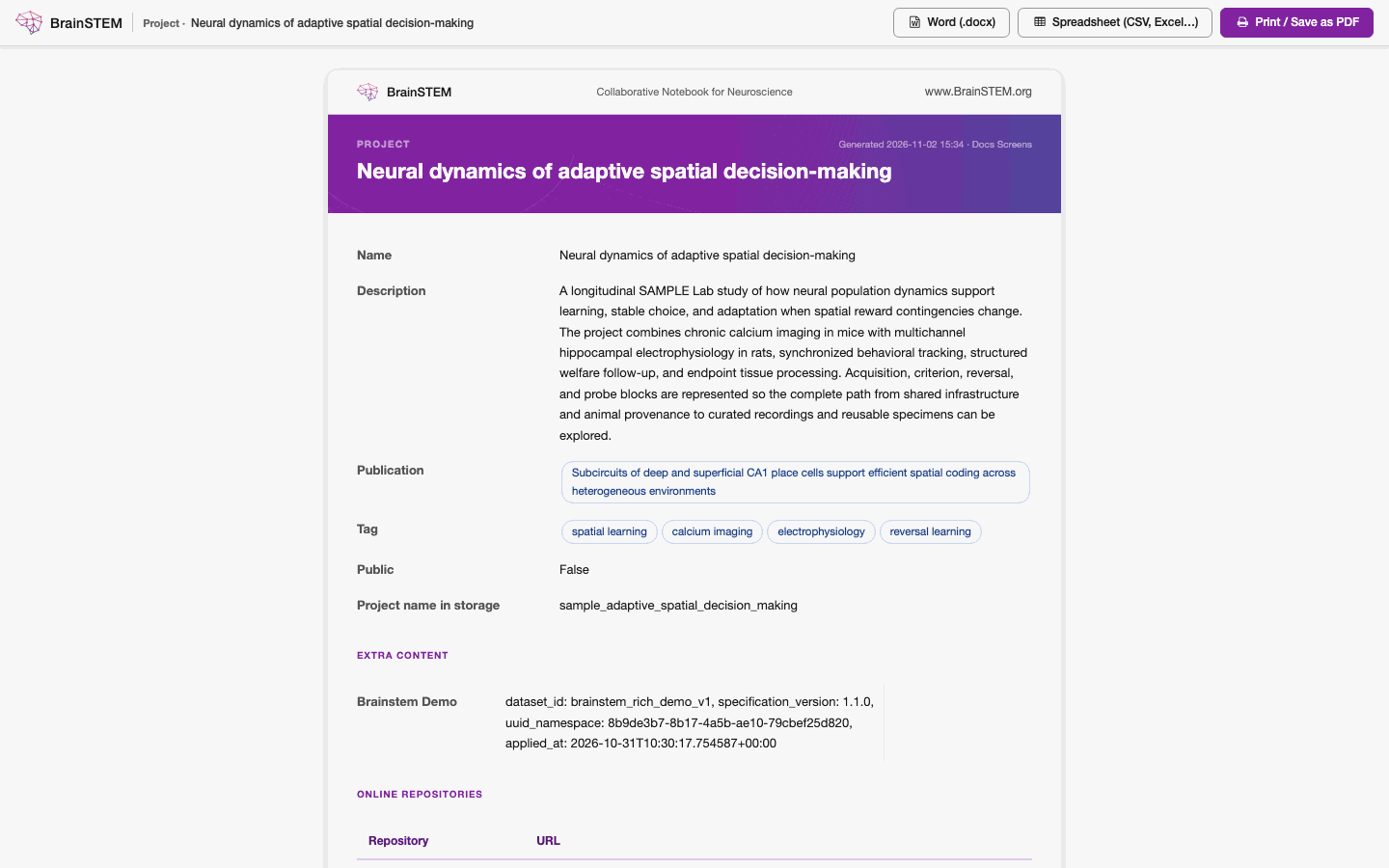
Print / Save as PDF opens a print-ready page with Word and spreadsheet downloads at the top.
Print / Save as PDF
Opens a print-ready page in a new tab with a BrainSTEM letterhead and a “Generated {date} · {user}” line. Use your browser’s print dialog (File → Print → Save as PDF) to make a PDF; BrainSTEM does not generate PDF files on the server. Pressing Ctrl/Cmd+P on a details or change page opens the same view. The page has a toolbar with Word (.docx), Spreadsheet (CSV, Excel…) and Print / Save as PDF.
Download Word
Downloads an editable Word document named {entry name}_export.docx. Each entry is a heading followed by label and value tables; formatting from rich text fields is stripped.
What print and Word include
- All exported fields of the entry; related entries as chips; choice fields by label.
- Type-specific details and coordinates expanded to labels and values using the type’s schema; tables as tables; values with units as “5 mV”.
- Child records (for example the materials of a procedure) as a table or cards with a count.
- Container contents: a project lists its subjects (name, species / strain, sex, status), sessions (name, type, date), collections, cohorts and specimen sets; a cohort its subjects; a collection its sessions; a breeding its offspring; a specimen its specimen procedures and derived specimens.
- Attachments appear by file name only; files are not embedded.
Spreadsheet
A spreadsheet export opens the Export {plural} page: “Export {plural} fields as a spreadsheet file. Choose a file format and optionally select which fields to include.” Choose CSV, TSV, XLSX, JSON or HTML and tick the fields under Fields to export. It is offered in these places:
| Where | Label | What is exported | Offered for |
|---|---|---|---|
| List view toolbar | Export | Every entry of the list, with its search and filters applied, not only the current page | Every list of entries: projects, subjects, sessions, collections, cohorts, breedings, specimen sets, specimens, procedures, procedure episodes, data acquisitions, behaviors, manipulations, specimen procedures, experimental interfaces, experimental interface and procedure episode templates, logs, equipment, consumable stocks, personal attributes, consumables, hardware devices, suppliers, journals, publications and the taxonomies. Not on the lists of procedure, data acquisition, manipulation and specimen procedure templates |
| Export dropdown of a details page | Spreadsheet (CSV, Excel…) | That entry | Projects, subjects, sessions, collections, cohorts, breedings, specimen sets, specimens, equipment, personal attributes, consumables, hardware devices, suppliers, journals, publications and the taxonomies. Not on the details pages of procedures, data acquisitions, behaviors, manipulations, specimen procedures, experimental interfaces, episodes, logs and consumable stocks |
| Export entry icon of a change form, and the toolbar of an entry’s print page | Spreadsheet (CSV, Excel…) | That entry | Every kind of entry whose list has Export |
Batch exports
In a list view, tick several rows and choose Export selected entries from the actions dropdown. The Export N {plural} page offers two formats:
- Print / Save as PDF: “Opens a print-ready page in your browser. Use File → Print → Save as PDF to save a copy.”
- Word document (.docx): “Downloads an editable Word document — useful for writing methods sections or sharing with collaborators.”
All selected entries go into one page or one document, each entry starting on a new page. Entries you cannot view are left out; if none remain, the page says “No entries available to export.” Very large selections can hit the request time limit; split them into smaller batches.
Download project data
On a project’s details page choose Export → Download project data. Any user who can read the project can use it, from the private portal.
The Download project page asks for:
- File format: JSON or XLS.
- Contents: Whole project or a single session. “Choose a session to export it with everything it touches: its subjects with their procedures and logs, and the setups, brain regions and other records they use. One session suits one NWB file. JSON only; the XLS workbook always covers the whole project.”
- JSON options: Pretty-print JSON (human-readable), Compress JSON output (gzip) (“Recommended for large projects.”) and Prepare in the background and email me when it is ready.
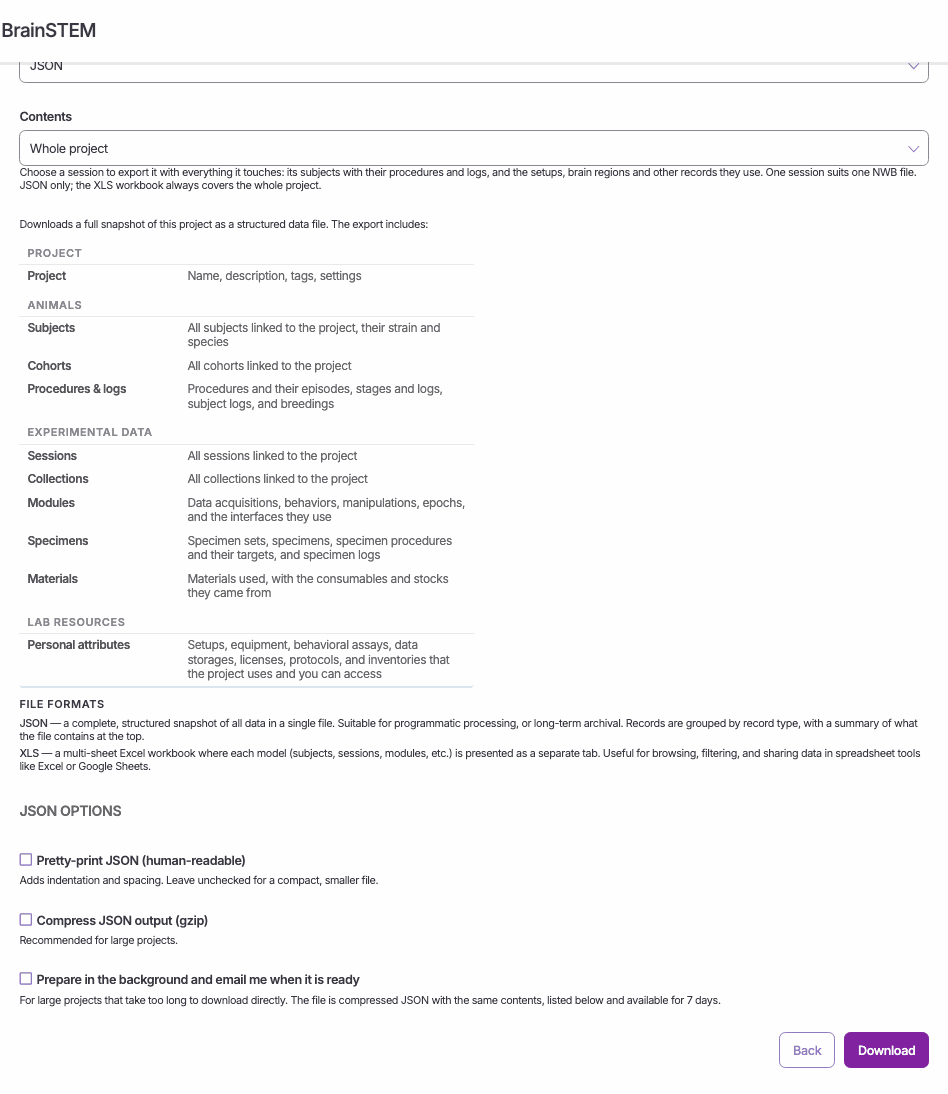
Download project: the file format (here JSON), the contents (Whole project), a description of every part of the export, the file formats and the JSON options.
The page lists what is included: the project; animals (subjects, cohorts, procedures and logs); experimental data (sessions, collections, modules, specimens, materials); and the lab resources (personal attributes) you have access to.
JSON format
The JSON file holds the project’s entries together with the catalogue entries they refer to (taxonomies, resources, publications). It also lists the lab resources you could not read, so you can tell what is missing. The file format is described on the API export page.
A project export is not a complete backup. Users appear by first and last name only; email addresses, permissions and uploaded files are left out (attachments by file name only). A background export is kept for 7 days, and its download link is valid for 5 minutes after you click it.
Excel workbook
The XLS export (project_{id}_export.xlsx) always covers the whole project, with one sheet each for the project, subjects, sessions, collections, cohorts, data acquisition, epochs, manipulations, experimental interfaces, procedures, specimen procedures, behavioral assays, data storage, setups and equipment.
Background exports
Tick Prepare in the background and email me when it is ready for large projects. BrainSTEM prepares a compressed JSON file and emails you “BrainSTEM project export ready: {project}” (or a failure notice) with the request time, record count, file size and the Available until date. The Your background exports table on the download page lists your ten most recent jobs with status Queued, Running · N%, Ready · until {date}, Failed or Expired, refreshing every 15 seconds.
Besides the retention in the note above: only you can download your export, and only while you can still read the project; at most 5 export requests per 10 minutes (“Too many export requests. Please wait a few minutes before requesting another.”).
STAR Methods report
On a project, Export → STAR Methods (preview) opens a draft methods report in a new tab, and STAR Methods (.docx) downloads it as {project name}_star_methods.docx. The preview has Download Word (.docx) and Print / Save clean PDF buttons. Anyone who can read the project can generate it.
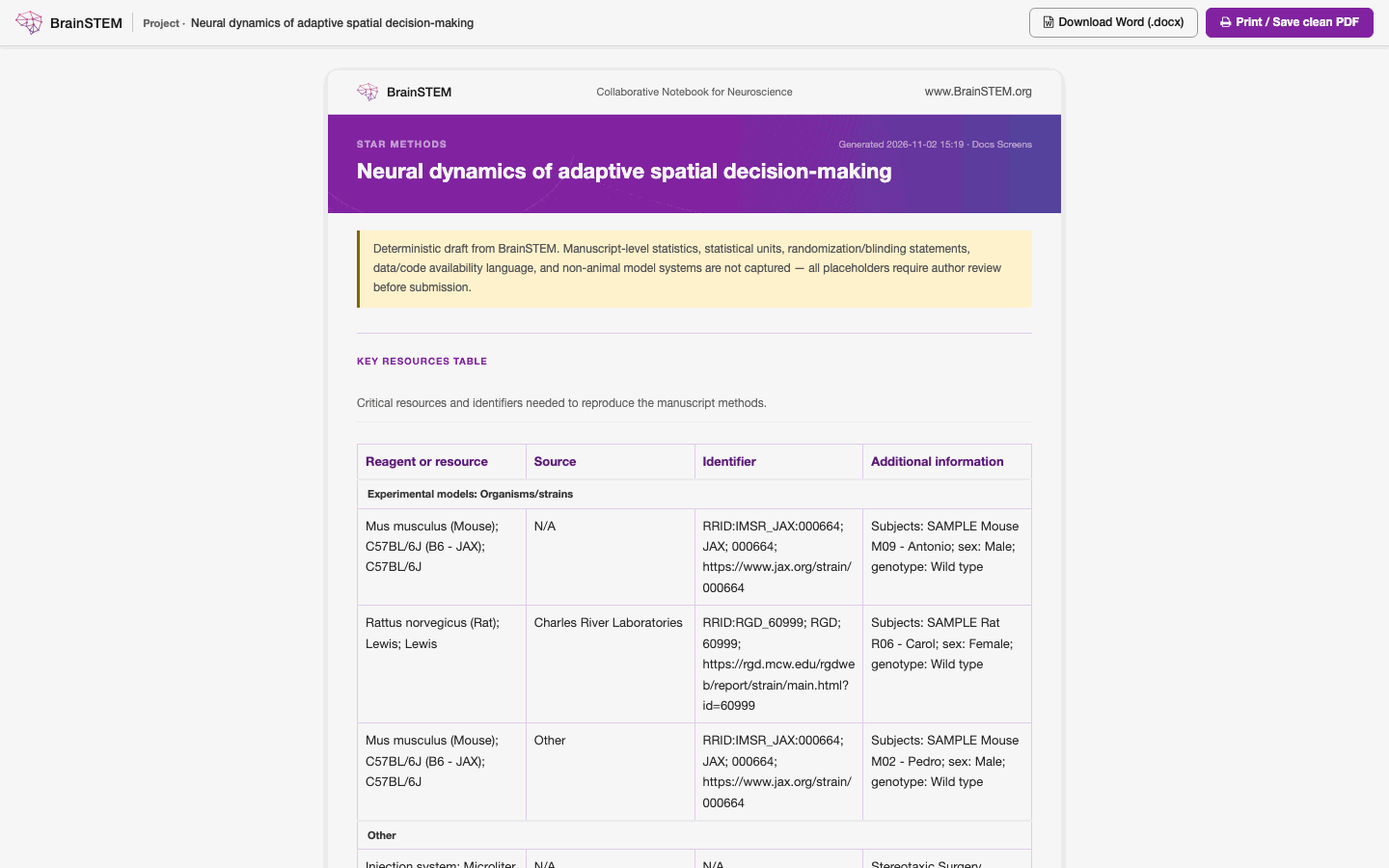
The STAR Methods preview of a project: the draft notice and the Key Resources Table, starting with the project’s species and strains, with Download Word (.docx) and Print / Save clean PDF at the top.
The report is a draft built only from your records: the same records always give the same text, and nothing is invented to fill a gap. As the preview states: “Manuscript-level statistics, statistical units, randomization/blinding statements, data/code availability language, and non-animal model systems are not captured — all placeholders require author review before submission.” Placeholders are marked [Author review required].
Sections
| Section | Content and source |
|---|---|
| Key Resources Table | Columns Reagent or resource, Source, Identifier, Additional information, grouped as Experimental models: Organisms/strains (subjects’ species, strain, genetic line, supplier and strain RRIDs), Experimental models: Cell lines (biological materials), Antibodies (antibodies and immunoreagents), Chemicals, peptides, and recombinant proteins (chemical reagents, pharmacological agents, physiological solutions, tracers and dyes), Deposited data (data storages and repository links of the project and its sessions), and Other (the remaining consumables, such as virus constructs and probe designs, and hardware devices, equipment, setups, behavioral assays, licenses, protocols). Consumables are those used in procedures, interfaces and templates, listed with supplier and RRID. Lab resources appear only if you can read them. There is no software category. |
| Experimental Model and Study Participant Details | Subjects grouped by species, strain, sex, genotype and supplier; up to 12 names per group, then “and N additional subjects” |
| Method Details | Cards for the project overview, cohorts, session collections, breeding, procedures, subject logs, procedure logs, specimen sets, experimental interfaces, recording sessions (data acquisitions, behaviors, manipulations, epochs), project method templates, and equipment and setup details |
| Source Records Used | Preview only: collapsible lists of the procedures, data acquisitions and manipulations the report drew from (up to 12 each) |
| Quantification and Statistical Analysis | Fixed placeholder text for the authors to replace |
| Additional Resources | Publications and repository links of the project, when present |
| Missing Information Report | “Cell Press-required or recommended items that BrainSTEM could not fully recover”, with counts of required and recommended items |
| Author Review Checklist | Checkboxes to confirm names, suppliers, catalog numbers and RRIDs in the Key Resources Table, add statistics, adjust tense and journal style, and fill in the lead contact and data availability |
The Word file uses the same headings in capitals under the title STAR METHODS.
Related
- Exports: the JSON format of Download project data and exports through the API
- Exporting to NWB and brainstem-nwb: converting a session export to an NWB file
- Single entry view: where the Export dropdown sits
- List view: Export selected entries and the toolbar Export button
- Public data: what visitors of the public portal can see and download