Templates
Table of contents
Introduction
A template is a reusable prefill for an entry. Instead of filling in the same anesthesia protocol, probe implant or staining recipe for every animal or every section series, you save it once as a template and apply it when you create the next record. The new entry is a copy that you can then edit; the template itself is not changed.
Templates exist for seven kinds of entry:
- Procedure templates prefill a procedure: type, type-specific fields, coordinate system and coordinates, target regions, equipment, protocol, licenses, notes, and the material rows and stages.
- Procedure episode templates prefill a procedure episode: intervention class, protocol, licenses, severity, recovery outcome and description.
- Specimen procedure templates prefill a specimen procedure: type, type-specific fields, target regions, equipment, protocol, licenses, notes, and the material rows and stages.
- Experimental interface templates prefill an experimental interface: type, persistence, target type (subject or specimen set), coordinate system and coordinates, target regions, equipment, notes, and the material rows.
- Data acquisition templates prefill a data acquisition: type, type-specific fields, equipment and notes.
- Manipulation templates prefill a manipulation: type, type-specific fields, equipment and notes.
- Material usage templates prefill one material usage row. They live inside a procedure, specimen procedure or interface template, or stand alone in a material template library.
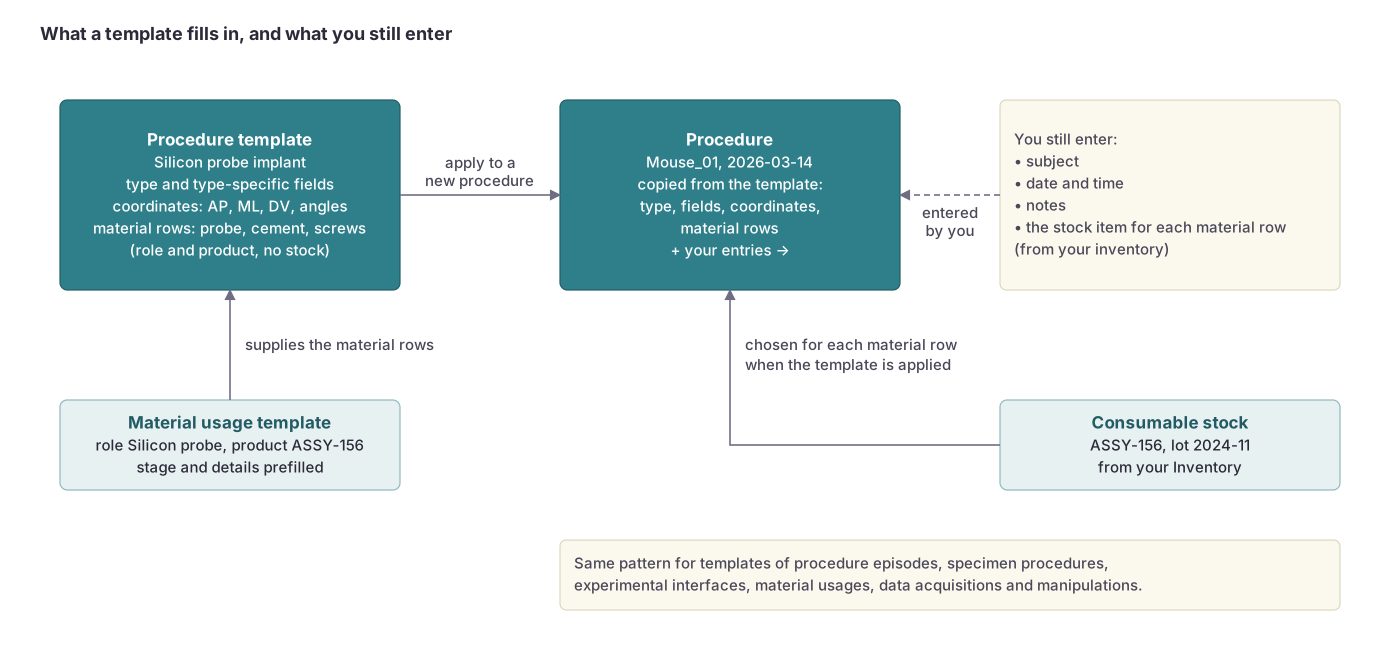 A template prefills type, type-specific fields, coordinates and material rows. You still enter the subject, the date, notes and the actual stock items; the same pattern applies to episode, specimen procedure, interface, material usage, acquisition and manipulation templates.
Common fields
Every template has the fields of the entry it prefills, minus the fields that tie an entry to a specific subject, specimen set or session (and minus the planning status). In addition:
| Field | Description |
|---|---|
Name | Name of the template (required). Example: “Isoflurane anesthesia, mouse”, “Neuropixels 1.0 CA1 implant”, “DAPI counterstain” |
Projects | Projects the template is shared with. Leave empty to keep the template personal. Members of a shared project can see and apply the template. |
Owner | The user who created the template (read-only). |
Summary | A one-line summary of the template’s content (read-only). |
Material usage templates
A material usage template plans the product, not the lot. It names a consumable from the shared catalog (optionally narrowed to one supplier) or a manual entry, together with the material role, the stage, the order, the type-specific details and notes. It does not name a consumable stock, because the stock on the shelf differs between labs and between months. When the template is applied, each planned material row is created on the new entry; where the row calls for a stock, you pick the stock from your inventory at that moment.
Material usage templates can belong to a procedure template, a specimen procedure template or an experimental interface template (they are applied together with it), or they can be library rows of their own with a name and shared projects, applied one at a time to an existing procedure, specimen procedure or interface through its “apply material template” action.
Applying a template
Templates are applied from the forms in the web interface. On the inline lists of a subject, specimen set or session, the “Insert data from a template” button inserts a new procedure, specimen procedure, manipulation or other entry filled from the template you pick. Experimental interfaces can be added “from a template” where interfaces are selected. The template picker lists the templates you own and the templates shared with your projects, most recently used first.
Applying a template copies its values into the new entry. Material rows that come from a template keep their planned source (catalog consumable or manual entry) until you choose a stock. Interface templates carry a target type, so an interface created from one is locked to subjects or to specimen sets from the start.
Permissions
Templates do not inherit from a subject or session. A template is visible and editable to its owner, and visible to the members of the projects it is shared with. Material usage templates inside a parent template follow that template; library material templates follow their own owner and shared projects.
Visit the permissions page to learn more.
API access
Each template family has its own API resource. Learn more about the fields and data structure on the Procedure template, Procedure episode template, Specimen procedure template, Experimental interface template, Data acquisition template, Manipulation template and Material usage template API pages.